Tag: Video Production Tips

  • How to Create Video Content: Complete Guide from Script to Screen

    How to Create Video Content: Complete Guide from Script to Screen

    In this blog, learn how to create video content with a step-by-step process from scripting to editing. Discover proven strategies to produce engaging videos and grow your audience faster.

    Video is like a magic tool that helps us tell stories and share information. Imagine you want to show your friends how you baked a delicious cake. Instead of just describing it, you can make a video where they see every step: mixing the ingredients, putting it in the oven, and the cake rising. They can even see your excited expression when you take it out. That’s the power of video – it lets you show things as if your friends were right there with you. It’s like having a window into your world.

    Benefits of Creating High-Quality Videos:
    Making videos that look and sound great can have some really cool advantages. Think about a funny cat video you saw online. If the video was blurry and you couldn’t hear the cat’s cute meow, it wouldn’t be as fun, right? High-quality videos make people more interested because they can see and hear everything clearly. If you’re trying to teach something or show your awesome dance moves, a high-quality video can help people understand and enjoy it better. Just like how a clear picture on your phone looks way better than a blurry one, making high-quality videos makes your stories and ideas shine.

    How to Create Video Content

    Defining Your Video’s Purpose and Goals: This is like figuring out why you want to make a video in the first place. Imagine you’re making a video about your favorite recipe. Is your goal to show people how to cook it step by step? Or maybe you want to make them excited about trying it out themselves? Knowing your purpose helps you focus on what your video should achieve.

    Identifying Your Target Audience: Think about who you want to watch your video. Let’s say you’re making a video about skateboarding tricks. Are you aiming your video at beginners who are just learning, or do you want to impress experienced skateboarders? Knowing your audience helps you make a video that they will enjoy and find helpful.

    Brainstorming Creative Ideas: This is like coming up with fun and interesting ways to make your video special. Imagine you’re making a video about a travel destination. Instead of just showing the famous landmarks, you could brainstorm creative ideas like interviewing locals to get their unique perspective or using time-lapse shots to capture the changing scenery.

    So, when you’re thinking about making a video, start by figuring out why you’re making it, who you want to watch it, and come up with cool and creative ways to make it awesome and memorable.
    How to Create Video Content

    Scriptwriting and Storyboarding

    1. Crafting a Compelling Narrative:
    Imagine you’re telling a story to your friends. You want to make it interesting so that they stay engaged. In video content creation, crafting a compelling narrative means creating a story that grabs the viewer’s attention and keeps them interested. For example, if you’re making a video about cooking, instead of just showing how to make a sandwich, you could start with a problem like a character being hungry and wanting something delicious. Then, as the video goes on, you show how the character solves this problem by making an amazing sandwich. This makes the video more exciting to watch.

    2. Structuring Your Script:
    Think of the script like a recipe you’re following to cook a meal. A good script helps you organize what you’re going to say or show in your video. It’s like having a plan so you don’t forget important parts. Let’s say you’re making a video about hiking. Your script could start with an introduction where you explain why hiking is fun and good for you. Then, you might have different sections, like talking about the best hiking trails, what gear to bring, and safety tips. Finally, you’d wrap up your video by summarizing why people should go hiking. Structuring your script this way helps you deliver information in a clear and organized manner.

    3. Creating Visual Storyboards:
    Imagine you’re drawing a comic book that shows what happens in your video. A visual storyboard is a series of simple drawings or pictures that represent each scene or shot in your video. It’s like a visual plan that helps you see how your video will look before you start filming. For instance, if you’re making a video about a funny cat adventure, your storyboard might have a drawing of the cat getting curious, another drawing of the cat chasing a butterfly, and a final drawing of the cat resting after its adventure. This helps you know how to film each part to tell your story effectively.

    So, to sum it up: Crafting a compelling narrative is about making your video interesting like a good story. Structuring your script is like making a plan for what you’re going to say or show. Creating visual storyboards is like drawing a comic book version of your video to help you visualize how it will look.

    Pre-Production Planning

    Pre-Production Planning

    Think of pre-production planning like getting ready for a big party. Before the party, you need to plan everything out to make sure it goes smoothly and everyone has a good time.

    Developing a Production Schedule

    Imagine you’re making a movie. You wouldn’t just start filming randomly, right? You’d create a plan that says when and where you’ll film each scene. This plan is like a schedule. It helps everyone know what to do and when. Just like you’d decide that you’ll have games at the party from 3 PM to 4 PM, and then food from 4:30 PM to 5:30 PM.

    Securing Locations, Props, and Talent

    Picture yourself making a video about a detective solving a mystery. You need a place where the detective’s office looks real, right? That’s the location. You also need things like a magnifying glass and a detective hat. These are props. And who’s going to act as the detective? That’s the talent. So, before your movie, you make sure you have the right place, things, and people.

    Assembling Your Production Team

    Think of making a video like building a sandcastle. You can’t do it all alone. You need help. Your production team is like your sandcastle-building crew. Just like some people dig and others shape the sand, different people in your team have different jobs. Someone might be good at filming, someone else at making things look nice, and another person might be good at making sure the actors say their lines right. Each person does their part to make the video awesome, just like each person at the sandcastle builds a part to make it amazing.

    Choosing the Right Equipment

    1. Cameras, Lenses, and Accessories:
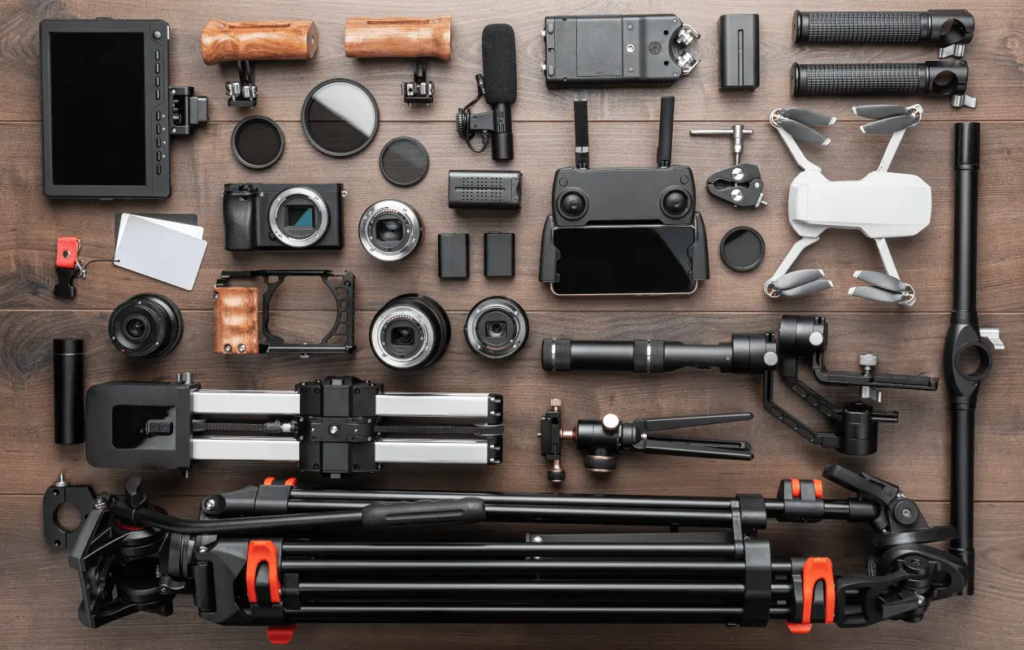
    Imagine you’re making a video just like a movie director. The camera is like your eyes – it captures what you see. But there are different types of cameras, like how there are different phones with various cameras. Some cameras are better for close-ups, and some are better for capturing a big scene. It’s like picking the right phone camera for a selfie or a beautiful landscape.

    Just like glasses help you see better, lenses help cameras focus on different things. For instance, if you’re filming a bird far away, you might need a lens that acts like binoculars for your camera. Accessories are like the cool extras you can attach to your camera to make it work even better, such as stabilizers that prevent shaky shots, or fancy screens that show you exactly what the camera is seeing.

    2. Audio Recording and Microphone Selection:
    Think about recording sound like recording a song on your phone. If you’re at a concert and you’re too far from the stage, the music might sound blurry and distant. But if you’re closer, you can hear the details better. Microphones are like your ears for the camera. They capture sound, and there are different types for different situations.

    For example, if you’re recording someone talking, you might use a microphone that clips to their clothes. This makes their voice clear even if there’s background noise. Just like picking the right tool for a job, you need to pick the right microphone so that the voices and sounds in your video are clear and not muffled.

    3. Lighting and Setup for Professional Shots:
    Have you ever noticed how a room looks different when it’s bright sunlight versus when it’s a cozy lamp light? Lighting in videos works in a similar way. Good lighting makes things look clearer and more interesting, just like good lighting in a photo makes your face look nice.

    Imagine you’re taking a picture of your friend. If the light is behind them, they might look like a dark shadow. But if the light is shining on their face, you can see their features clearly. For videos, you need to set up lights in a way that makes everything look just right, whether it’s an interview, a scene at night, or a fun adventure.

    In short, choosing the right equipment for making videos is like picking the right tools for a craft project. You need the right camera and lens to capture the scenes, the right microphone to catch the sounds, and the right lighting to make everything look great, just like choosing the right colors for your craft project to make it look awesome.
    How to Create Video Content

    Filming Techniques and Principles

    1. Framing and Composition:
    Imagine you’re taking a picture with your phone. When you decide what to include in the picture and where to position it, you’re thinking about framing and composition. In videos, it’s similar. It’s about arranging everything you see in the video in a way that looks pleasing and helps tell the story.

    For example, think of a cooking video where the chef is showing how to make a delicious cake. They want to make sure the camera captures not just their face but also their hands mixing the ingredients and the cake in the oven. This way, you can see everything clearly and understand what’s happening.

    2. Camera Movement: Panning, Tracking, and Dolly Shots:
    Have you ever watched a video where the camera seems to move smoothly from side to side, like showing a beautiful view of a city skyline? That’s called panning. It’s like when you turn your head to look around.

    Tracking is when the camera follows something that’s moving, like a dog running through a park. It’s like the camera is “tracking” the action.

    A dolly shot involves moving the entire camera closer or farther away from the subject while keeping the subject in focus. Imagine you’re watching a video about a skateboarder doing tricks. As the skateboarder rides towards you, the camera starts far away and smoothly moves in to show more detail.

    3. Capturing Dynamic Shots: Close-ups, Wide Shots, and Angles:
    Close-ups are like looking at something really close, so you can see all the small details. Imagine you’re filming a video about a butterfly. A close-up shot would show the butterfly’s wings and its colors up close.

    Wide shots, on the other hand, show a lot of what’s happening around the main subject. Think of a concert video where you can see the entire stage and the excited crowd.

    Angles are about where the camera is placed in relation to the subject. Imagine you’re filming a video of a basketball game. If you place the camera low to the ground, it’ll make the players look big and powerful. But if you film from above, the players might look smaller and the court might seem larger.

    These filming techniques and principles help make videos more interesting to watch and help tell stories in a visually appealing way.

    On-Set Best Practices

    On-Set Best Practices

    When you’re making a video, the “on-set” is the place where you’re actually filming. It’s like the stage where a play happens. On-set best practices are like the rules and good habits that everyone follows to make sure the video turns out great.

    Directing Your Talent and Crew

    Imagine you’re making a movie, and you have actors who play different characters. The director is like the boss who tells the actors what to do and how to act. They help the actors understand their roles and emotions. For example, if a scene is about a happy family dinner, the director might tell the actors to smile and talk like a real family.

    Monitoring Audio and Video Quality

    Think about a video you’ve watched where the sound was too quiet, and you had to turn up the volume, or the picture was blurry. Monitoring audio and video quality means keeping an eye on these things while filming. It’s like checking that the volume is just right and the picture is clear. If it’s not, the crew makes adjustments to fix it.

    Problem-Solving on the Set

    Sometimes things don’t go as planned while filming. It’s a bit like a puzzle. Imagine you’re shooting a scene outdoors, but suddenly it starts raining. Problem-solving is like finding a solution to this puzzle. Maybe the crew quickly sets up umbrellas to keep the actors and equipment dry, or they change the scene to make it work with the rain.

    In short, “on-set best practices” are about following the right ways to film, “directing” is guiding actors to act well, “monitoring audio and video quality” is checking that everything sounds and looks good, and “problem-solving” is finding creative solutions when unexpected things happen.

    Capturing Quality Audio

    1. Selecting the Right Microphone for Each Situation:
    Think of microphones as tools that capture sound, just like a camera captures images. Imagine you’re recording an interview. If you use a microphone built into a smartphone, it might pick up a lot of background noise like people talking nearby or cars passing by. But if you use a microphone that’s designed to capture just the voice of the person speaking, you’ll get clearer and better quality sound. It’s like using a magnifying glass to see tiny details – the right microphone helps you hear the important stuff clearly.

    2. Recording Clear Voiceovers and Sound Effects:
    Let’s say you’re making a video about a superhero flying through the sky. You might need a voiceover to describe what’s happening. If you record this with a lot of echo in a big empty room, it might sound like the voice is bouncing around. But if you use a microphone close to your mouth, the voice will be clear and easy to understand, like talking to someone right next to you. Similar to how you choose a quiet spot to talk on the phone so the person on the other end can hear you clearly.

    3. Audio Mixing and Cleaning:
    Imagine you’re at a party with music playing in the background, and you’re trying to have a conversation with a friend. Sometimes the music is too loud, and you can’t hear your friend properly. In video-making, we face a similar challenge. After recording different sounds like voices, music, and sound effects, we need to adjust their volumes so they all sound balanced and nothing is too overpowering. Also, sometimes there might be a hissing sound or a sudden noise in the recording, like a sneeze. Just like you clean a dirty window to see clearly, we “clean” the audio by removing these unwanted sounds, making the final sound much better and easier to listen to.

    Remember, capturing good audio is like having a clear phone call – you want to hear everything without any disturbances or distractions. The right microphone, careful recording, and a bit of editing help us achieve that clear and enjoyable audio experience in videos.

    Editing Workflow

    Editing Workflow:

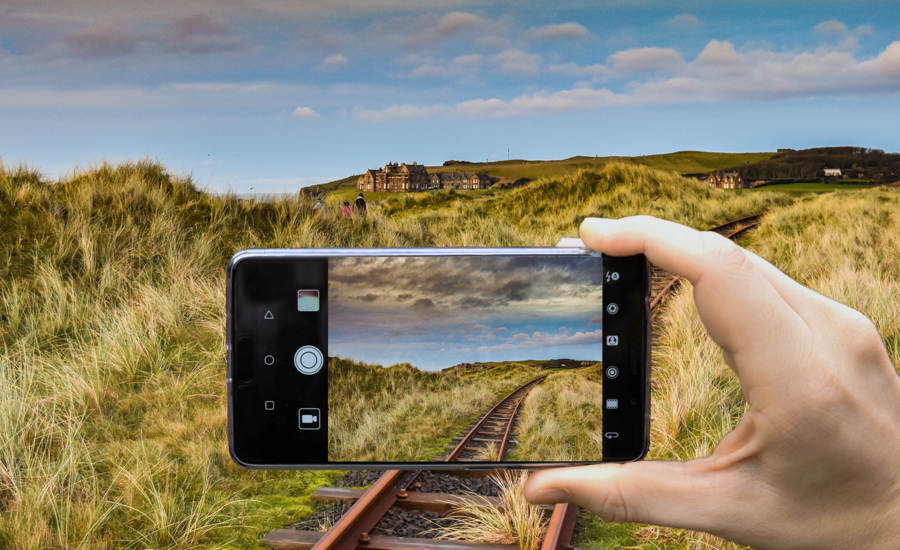
    Think of editing as putting together a puzzle. You have all these pieces (video clips) that you need to arrange in a way that tells a clear and engaging story. Editing is like the glue that holds everything together and makes the final video look smooth and interesting.

    Importing and Organizing Footage:

    Imagine you took a lot of pictures during a vacation. Before you make an album, you would want to sort those pictures, right? Similarly, when you’re editing a video, you start by bringing in all the video clips you shot. It’s like gathering all your vacation pictures in one place. Then, you organize these clips so you can easily find what you need when you’re putting your video together. Just like you’d put all your beach pictures together and all your mountain pictures together.

    The Art of Cutting: Editing Techniques and Timing:

    Have you ever seen a movie where scenes change quickly? That’s because of cutting. It’s like changing the channel on your TV really fast. When you’re editing, you decide which parts of your video clips to use and how long each part should stay. It’s like picking the best moments from your vacation pictures and deciding how long to show each picture. This helps make your video exciting and keeps people interested.

    Adding Transitions, Visual Effects, and Titles:

    Imagine you’re reading a storybook, and every time you turn the page, there’s a special design that connects the pages together. That’s a bit like transitions in videos. Transitions are cool ways to smoothly move from one scene to the next. They can be like a fade, where the picture slowly disappears and the next one appears.

    Visual effects are like magic touches that can make your video look more interesting. For example, if you’re making a video about space, you might add stars twinkling in the background to make it feel more spacey.

    Titles are like the chapter headings in a book. They tell you what the next part of the video is going to be about. Just like when you see a title like “Beach Adventures” before a section of your vacation pictures.

    So, in short, editing is like putting together a story with your video clips, making sure they flow nicely, look cool, and help people understand what’s happening.
    How to Create Video Content

    Color Correction and Grading

    Color Correction and Grading

    Have you ever noticed that sometimes videos or movies look a little different in terms of colors? That’s because of color correction and grading. It’s like giving your video a special look to make it better and match what you want people to feel.

    Enhancing Visual Consistency

    Imagine you’re making a video and you filmed some parts on a sunny day and some indoors with artificial lights. The colors might look different between these shots. Color correction helps make all the scenes look like they belong together. It’s like making sure the colors look nice and even so that the video flows smoothly.

    Adjusting Color Balance and Exposure

    Think of color balance like a temperature knob for your video. Sometimes, videos can look too warm (orange-ish) or too cool (blue-ish). Color balance fixes that so things look just right. Exposure is like making sure the video isn’t too bright or too dark. Imagine taking a picture in a room with too much light – everything might look washed out. Color correction fixes this by making sure everything is clear and easy to see.

    Creating a Mood through Color Grading

    Have you noticed that some videos feel cheerful, while others feel mysterious or serious? Color grading is like painting a mood with colors. If you want your video to feel happy, you might use bright and vibrant colors. But if you want it to feel mysterious, you might use darker tones. Remember those Instagram filters? It’s a bit like that, but for videos.

    So, color correction and grading help fix the colors in your video, make them match, and even set the mood you want to convey. It’s like giving your video its own unique personality through colors!

    Thank You!

  • How to Use Storytelling for YouTube Success | Complete Guide for 2026

    How to Use Storytelling for YouTube Success | Complete Guide for 2026


    In this blog, learn how to use storytelling for YouTube success with proven techniques, engaging content strategies, and tips to increase views, watch time, and subscribers.

    We’ll dive into why storytelling is so important when it comes to creating videos for YouTube. Think about your favourite movies or TV shows; they capture your attention because of the stories they tell. Similarly, on YouTube, stories have the ability to connect with viewers emotionally and keep them engaged. When you tell a story in your videos, whether it’s about your experiences, knowledge, or even fictional tales, you’re making your content more relatable and interesting. For example, a travel vlogger sharing their adventures isn’t just showing places, but they’re telling a story of exploration and discovery, which makes their videos captivating to watch.

    How to Use Storytelling for YouTube Success

    Here, we’ll explore why having a captivating and interesting narrative is crucial for achieving success on YouTube. Imagine two cooking channels: one just shows recipes being prepared, while the other shares the story behind each recipe – where it came from, the memories associated with it, or the challenges faced while cooking it. The channel with the compelling narrative is likely to stand out because it’s not only teaching how to cook but also connecting on a personal level. A great narrative can make viewers stay longer, watch more videos, and even subscribe to your channel. It’s like reading a good book – you want to keep turning the pages, or in this case, watching more videos.

    The Basics of Storytelling

    Character: In a story, characters are the people or creatures who experience the events. They can be heroes, villains, or regular individuals. Characters make the story relatable and interesting. For example, in a YouTube video, if you’re telling a story about overcoming challenges, your main character could be someone who faced difficulties and grew stronger.

    Conflict: Every good story has a problem or challenge that the characters need to deal with. This conflict creates tension and keeps the audience engaged. Imagine your character wants to achieve a dream, but they encounter obstacles like self-doubt, financial issues, or competition. This conflict makes the story more exciting and gives the character a goal to work towards.

    Resolution: The resolution is how the conflict is resolved. It’s the outcome or solution to the problem. Your character might overcome their obstacles through hard work, support from friends, or personal growth. This resolution provides a sense of closure and satisfaction for your audience.

    Storytelling for YouTube Success

    Building Blocks of Narrative: Beginning, Middle, and End

    Beginning: This is where you introduce your characters and set the stage. You give viewers the necessary information to understand the story’s context. For instance, if your story is about a chef who opens a unique restaurant, the beginning would introduce the chef, the restaurant’s concept, and maybe a glimpse of their struggles.

    Middle: The middle is where the story develops. It’s where the conflicts arise, challenges are faced, and emotions intensify. Continuing with the chef example, the middle could show the chef’s struggles to get customers, develop their menu, and handle unexpected setbacks.

    End: The end wraps up the story. It shows how the characters’ efforts pay off and resolves the conflicts. In the chef’s story, the end might depict the successful launch of the restaurant, the chef’s fulfillment, and maybe a heartfelt moment of gratitude from satisfied customers.

    The Hero’s Journey: A Framework for Crafting Engaging Stories

    The Hero’s Journey is a storytelling framework that many successful stories follow. It involves a hero (your main character) embarking on an adventure, facing challenges, and growing through the experience. Here’s how it breaks down:

    • Call to Adventure: The hero receives a challenge or a quest that sets the story in motion. This could be an opportunity they’re unsure about, like our chef deciding to start a restaurant.
    • Departure: The hero leaves their comfort zone and enters the unknown. This mirrors the chef’s decision to leave their stable job and venture into the risky world of entrepreneurship.
    • Trials and Tests: The hero encounters obstacles and enemies, which test their abilities and determination. In the chef’s story, these could be challenges like finding investors or dealing with negative reviews.
    • Climax: The hero faces the biggest challenge, often a decisive confrontation. For the chef, this could be a critical moment when they need a positive review from a renowned food critic to save their struggling restaurant.
    • Return: The hero returns home transformed, having learned important lessons. The chef might return to their restaurant with a renewed passion and innovative ideas that lead to success.
    • Resolution: The hero’s journey concludes with the resolution of conflicts and a sense of growth. The chef’s journey ends with a flourishing restaurant and personal fulfillment.

    Remember, these storytelling elements and frameworks can be adapted creatively to suit the content you want to create for your YouTube channel.

    Identifying Your Audience and Niche

    When you’re making YouTube videos, it’s like having a conversation with a group of people. Your target audience is the group of people you want to talk to and share your stories with. Think about who these people are: their age, interests, hobbies, and what problems or interests they have. For example, if you love cooking and want to share recipes and cooking tips, your target audience might be people who enjoy cooking at home but want to learn new techniques.

    Choosing a Niche: Tailoring Your Stories to Match Viewer Interests

    A “niche” is like a special topic or subject that you focus on in your videos. It’s something you’re really passionate about and knowledgeable in. For example, your niche could be travel, video games, beauty, or DIY crafts. When you choose a niche, you’re deciding what your videos will mainly be about. This helps you connect with people who are also interested in that topic. If you’re a travel enthusiast, your niche might be exploring different countries and cultures, and your videos could be about your travel experiences, tips for travelers, and exciting places to visit.

    Example:
    Imagine you love playing guitar and you’re really good at it. Your target audience could be people who want to learn how to play the guitar or improve their skills. So, your niche could be “Guitar Tutorials and Tips.” You’d make videos teaching different guitar techniques, explaining how to play popular songs, and sharing advice on choosing the right guitar. This way, you’re tailoring your content to the interests of people who love music and want to become better guitar players.

    Research and Pre-production

    Look at popular YouTube channels that tell stories effectively. Observe what makes their stories engaging. For instance, if you’re interested in travel storytelling, channels like “Lost LeBlanc” and “Kara and Nate” often share their travel experiences in captivating ways.

    Story Concept Development: Brainstorming and Refining Ideas

    Think about what stories you want to share on your YouTube channel. It could be personal experiences, life lessons, or even fictional tales. For instance, if you’re passionate about cooking, you might brainstorm stories about learning to cook from family traditions or experimenting with new recipes.

    Scriptwriting Techniques: Creating Engaging and Conversational Scripts

    Once you have a story idea, write a script for your video. Make it sound like a casual conversation rather than a formal lecture. Imagine you’re talking to a friend. Use relatable language and include pauses for effect. If you’re telling a story about a hiking adventure, your script might have sentences like, “So there I was, standing at the edge of the cliff, heart racing, wondering if I should take the leap.”

    Remember, research helps you understand what works, brainstorming helps you generate unique ideas, and scriptwriting ensures your story is engaging and relatable to your viewers.

    Structuring Your Storytelling

    This is the beginning of your video where you need to catch the attention of your viewers right away. Imagine starting your video with something exciting or intriguing, like a surprising fact, a funny joke, or a thought-provoking question. The goal is to make people curious and excited about what they’re going to watch. For example, if you’re making a video about a travel adventure, you might start with a sentence like, “Have you ever wanted to explore hidden, breath taking places that only a few people have seen?”

    Establishing Characters and Setting: Making Your Story Relatable
    In this part, you introduce the main characters (people or animals) of your story and describe the place where the story is happening. This helps viewers connect with the story by getting to know who’s involved and where things are taking place. For instance, if you’re making a cooking video, you might introduce yourself as the chef and show the kitchen where you’ll be preparing the delicious recipe you’re about to share.

    Building Conflict and Tension: Keeping Viewers Invested
    Every good story needs something interesting or challenging to happen. This is where conflict and tension come in. Conflict can be a problem, a challenge, or a mystery that needs to be solved. Tension is the feeling of curiosity or excitement that comes from wondering what’s going to happen next. In a video about solving a mystery, you could introduce a puzzling clue that leaves viewers curious and eager to find out more.

    Climax and Resolution: Delivering Satisfying Endings
    The climax is the most exciting part of your story, where everything comes to a peak. It’s like the turning point when things really get intense. After that, you provide the resolution, which is the ending that ties up all the loose ends and answers the questions raised in the story. In a video about an adventure race, the climax might be the moment when the racers are neck and neck, and the resolution could be revealing who wins and how they celebrated their victory.

    Remember, each of these parts helps create a flow that keeps your viewers engaged and curious about what happens next in your story.

    Storytelling for YouTube Success

    Visual and Audio Elements

    Visual and audio elements play a crucial role in making your YouTube stories engaging and memorable. They help create an immersive experience for your viewers and enhance the emotions and atmosphere of your narratives.

    The Role of Visuals: Using B-roll, Cutaways, and Visual Metaphors

    Visuals refer to the images and videos you show on screen while telling your story. Instead of just showing yourself talking throughout the entire video, you can use different types of visuals to keep your viewers interested. Here are a few techniques:

    • B-roll: This is additional footage that you can use to show what you’re talking about. For example, if you’re telling a story about a vacation, you can include clips of the places you visited, the food you ate, and the activities you did.
    • Cutaways: These are quick shots that you insert to break up the main footage. For instance, if you’re narrating a cooking tutorial, you can show close-up shots of the ingredients, the cooking process, and the final dish while you’re explaining each step.
    • Visual Metaphors: These are images or scenes that symbolize an idea or emotion. Let’s say you’re discussing personal growth; you could use footage of a seed sprouting into a plant to visually represent the concept of transformation.

    Music and Sound Effects: Enhancing Emotions and Atmosphere

    Music and sound effects add an extra layer of emotion and atmosphere to your storytelling. They can help set the mood and make your viewers feel more connected to your story:

    • Music: The right music can emphasize emotions in your story. For example, if you’re telling a heartwarming story, gentle and uplifting music can evoke those feelings. On the other hand, if your story is about suspense, using tense music can heighten the drama.
    • Sound Effects: These are sounds that you can add to enhance specific moments. If you’re describing a scene where someone is walking through a forest, adding the sounds of rustling leaves and chirping birds can make the viewers feel like they’re right there with the character.

    Imagine you’re making a YouTube video about a hiking adventure. As you narrate your experience, you can show breathtaking visuals of the landscapes you explored (B-roll), insert shots of details like wildflowers and wildlife (cutaways), and use soft, inspiring music to accompany those visuals. When you reach a moment where you conquered a challenging hill, you could use triumphant music to emphasize the accomplishment. And when you’re describing the serene silence of reaching the mountain peak, you can enhance it with the sound of wind blowing and birds chirping.

    Narration and Voiceover Techniques

    1. Developing Your On-screen Presence: Connecting with Viewers
    This is about how you present yourself while speaking on camera. It’s important to be natural, relatable, and confident. Imagine you’re having a friendly conversation with your viewers. Make eye contact with the camera, smile, and be yourself. Share your enthusiasm for the story to draw viewers in.

    Example: If you’re telling a story about your travel experiences, show genuine excitement when talking about the places you visited. Your energy and engagement will make viewers feel like they’re right there with you.

    2. Voice Modulation and Delivery: Conveying Emotions Effectively
    This involves using your voice to match the emotions of the story. Adjust your tone, volume, and pace based on what’s happening in the narrative. If it’s an exciting part, speak faster and with excitement. If it’s a sad moment, slow down and use a softer tone to evoke empathy.

    Example: If your story involves a suspenseful moment, speak a bit slower and lower your voice to build tension. Then, when the exciting part comes, speed up your speech and raise your voice to create a dynamic and engaging experience for your viewers.

    Remember, practice makes perfect. As you get more comfortable with these techniques, your storytelling on YouTube will become even more captivating.

    Pacing and Timing

    Controlling the Pace: Maintaining Interest Throughout Your Story
    Pacing is like the speed at which your story unfolds. Imagine you’re telling a story to a friend: if you talk too fast, they might miss important details, but if you talk too slowly, they might get bored. Similarly, in your YouTube video, you want to keep the right balance so that viewers stay engaged.

    Example: Let’s say you’re making a video about a travel adventure. You would want to show exciting parts like exploring new places, trying local food, and meeting interesting people at a slightly faster pace. But when you’re describing something emotional, like a meaningful conversation you had during the trip, you might slow down a bit to let the feelings sink in.

    Leveraging Cliffhangers: Keeping Viewers Coming Back for More
    A cliffhanger is like a little suspenseful ending that leaves viewers curious and excited to know what happens next. It’s like when a TV show stops at an intense moment, making you want to watch the next episode to find out what happens.

    Example: Imagine you’re making a video about a cooking challenge. Just as you’re about to reveal whether your dish turned out great or not, you stop the video. This makes viewers wonder if you succeeded or not, and they’ll be more likely to come back to see the next part. It’s a way to create anticipation and keep people interested in your content.

    Remember, the goal is to keep your viewers engaged and wanting to see more, and understanding pacing and timing can help you do that effectively.

    Editing and Post-production

    Editing and post-production involve taking the raw footage you’ve shot and turning it into a polished and engaging video that tells a compelling story. It’s like putting together all the puzzle pieces to create a complete picture.

    Crafting Seamless Transitions: Maintaining Flow in Your Story

    Transitions are like bridges that connect different parts of your video smoothly. Imagine you’re telling a story about a vacation. If you jump abruptly from one scene to another, it might confuse your viewers. Instead, use transitions like fades, cuts, or creative transitions (like swipes or zooms) to guide viewers from one scene to the next. For instance, if you’re showing a transition from packing your bags to arriving at the airport, a fade could gently lead viewers between these moments without them feeling lost.

    Adding Graphics and Text: Enhancing Understanding and Engagement

    Graphics and text help provide additional information or emphasize key points in your video. They’re like signposts that guide your viewers. For example, if you’re explaining a recipe, you can use text to display the ingredients and their quantities on the screen as you talk about them. This makes it easier for viewers to follow along and remember the details.

    Color Grading and Visual Style: Setting the Tone for Your Narrative

    Color grading is like giving your video a specific mood or atmosphere using colors. Think of it as choosing the “filter” for your video, just like the filters you use on social media photos. For instance, if you’re telling a nostalgic story, you might use warm and soft colors to evoke a sense of fond memories. If you’re telling a suspenseful story, you might use darker tones to create a sense of mystery and tension.

    Visual style is about maintaining a consistent look throughout your video. If you’re creating a series of videos, having a consistent visual style helps your viewers recognize your content easily. It could include things like using the same font for text, using specific types of shots (like close-ups or wide shots), and using a similar color palette in all your videos.

    Feedback and Iteration

    Seeking and Incorporating Viewer Feedback:
    This step is about asking your viewers for their opinions and thoughts about your videos. You want to know what they liked, what they didn’t like, and any suggestions they might have. It’s like asking a friend how you can make your cake taste better. For example, if you make videos about travel, you might ask your viewers if they enjoyed the destinations you covered or if they’d like to see more details about local food and culture. When you get this feedback, you can use it to make your videos more interesting and enjoyable for your audience.

    The Art of Iterative Storytelling: Learning and Evolving:
    “Art of iterative storytelling” means that you don’t just make a video and forget about it. You make it, you show it to people, you listen to their thoughts, and then you use those thoughts to improve the next video. It’s like painting a picture, looking at it from a distance, and then adding more colors to make it even better. For instance, if you’re telling stories about technology, and your viewers say they want more explanations about how things work, you can start adding more detailed explanations in your future videos. This way, your videos keep getting better and more interesting over time.

    Promotion and Engagement

    Crafting Captivating Thumbnails and Titles

    When you’re scrolling through YouTube, you often decide what to watch based on the images and titles you see. Thumbnails are the small pictures that represent videos, and titles are the names of the videos. Making these really interesting can attract more people to click on your videos. For example, if your video is about cooking a delicious dessert, you could have a thumbnail showing that dessert with a bright, colorful background, and your title could be something like “Mouth-Watering Chocolate Delight: Easy Dessert Recipe!”

    Using Social Media and Collaborations to Extend Your Story’s Reach

    Social media platforms like Instagram, Twitter, and Facebook are places where people hang out online. You can use these platforms to tell people about your videos. Let’s say you made a video about traveling to a beautiful beach. You could share a picture from that beach on your Instagram and tell people that they can watch the full adventure on your YouTube channel. Collaborations are when you work with other YouTubers. If you and a friend both make videos about hiking, you could make a video together where you explore a trail, and then both of you tell your viewers to check out the other’s video. This way, you both get to reach new audiences.

    In simple words, promotion and engagement mean making your videos more attractive to people and telling them about your videos in different ways, like using social media and working with others. This helps more people find and watch your stories on YouTube.

    Measuring Success and Analytics

    This section is all about figuring out how well your storytelling videos are doing and using data to improve. It’s like checking if people are enjoying your stories and finding ways to make them even better.

    Understanding YouTube Analytics: Tracking Story Engagement

    Think of YouTube Analytics like a special tool that shows you how many people are watching your videos, how long they’re watching, and what parts they like the most. It’s like having a window into your viewers’ minds. For example, if you see that many viewers stop watching after a certain point in your story, you might want to figure out what’s causing them to lose interest at that moment.

    Imagine you have a video where you tell a thrilling adventure story, but a lot of viewers stop watching just before the exciting part. By looking at the analytics, you’d notice this drop-off. This tells you that maybe you need to make the beginning more exciting to grab their attention right away.

    Storytelling for YouTube Success

    Adapting Strategies Based on Viewer Insights

    This means changing your storytelling plans based on what you learn from the analytics. It’s like if you’re cooking a dish and you taste it to see if it needs more salt or spices. Similarly, you “taste” your videos’ performance through analytics and adjust your storytelling to make it even more interesting for your viewers.

    For instance, if you notice that viewers from a certain age group are really enjoying the mystery elements of your stories, you might decide to add more mysteries to your future videos to keep them engaged. Or if you find that most people are watching your videos on weekends, you might plan to release new stories specifically on those days to catch more attention.

    In simpler words, you’re using the information from YouTube Analytics to fine-tune your storytelling so that it resonates better with your audience and keeps them wanting more.

    Thank You!