Tag: Remarketing

  • Retargeting Ads: Get Back Your Lost Customers | Part-24

    Retargeting Ads: Get Back Your Lost Customers | Part-24

    Module 4: Google Ads / SEM

    In today’s competitive digital landscape, most website visitors do not convert on their first visit. According to various studies, only around 2% of users convert on their first interaction with your website. So what happens to the other 98%? Do they vanish forever? Not if you understand the power of Retargeting Ads.

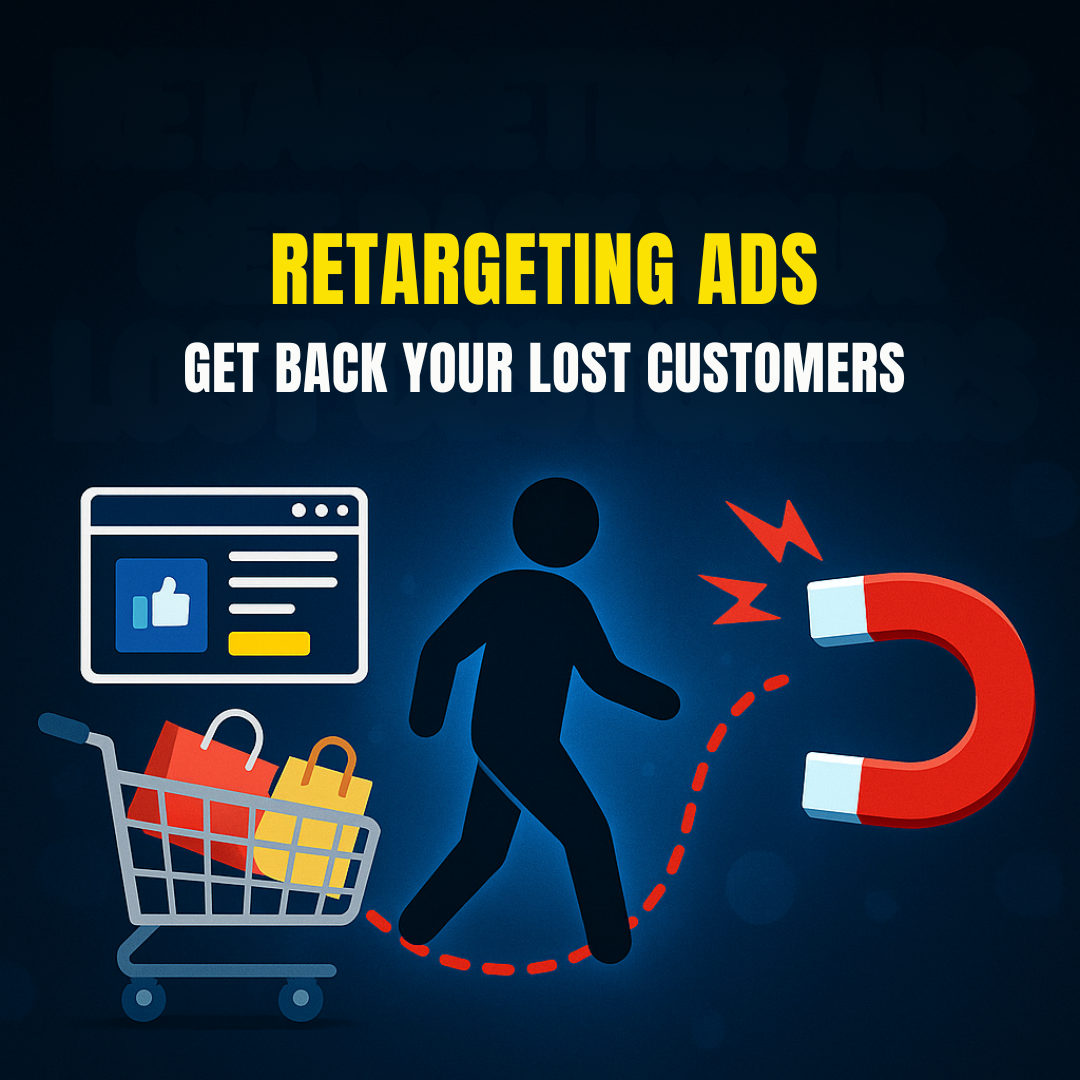
    Retargeting Ads (also known as remarketing) are a type of Search Engine Marketing (SEM) strategy used to get back your lost customers by displaying personalized ads to users who have previously visited your website or interacted with your content.

    This module from the Digital Marketing Course by Kamlesh Singad at CWK Agency will break down everything you need to know about retargeting ads on Google Ads, including step-by-step setup, best practices, and advanced strategies for maximum ROI.

    What Are Retargeting Ads?

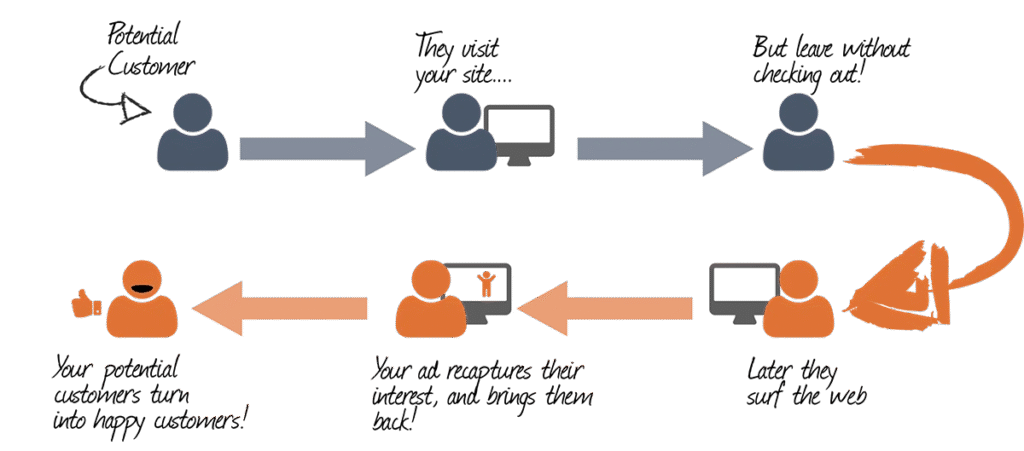
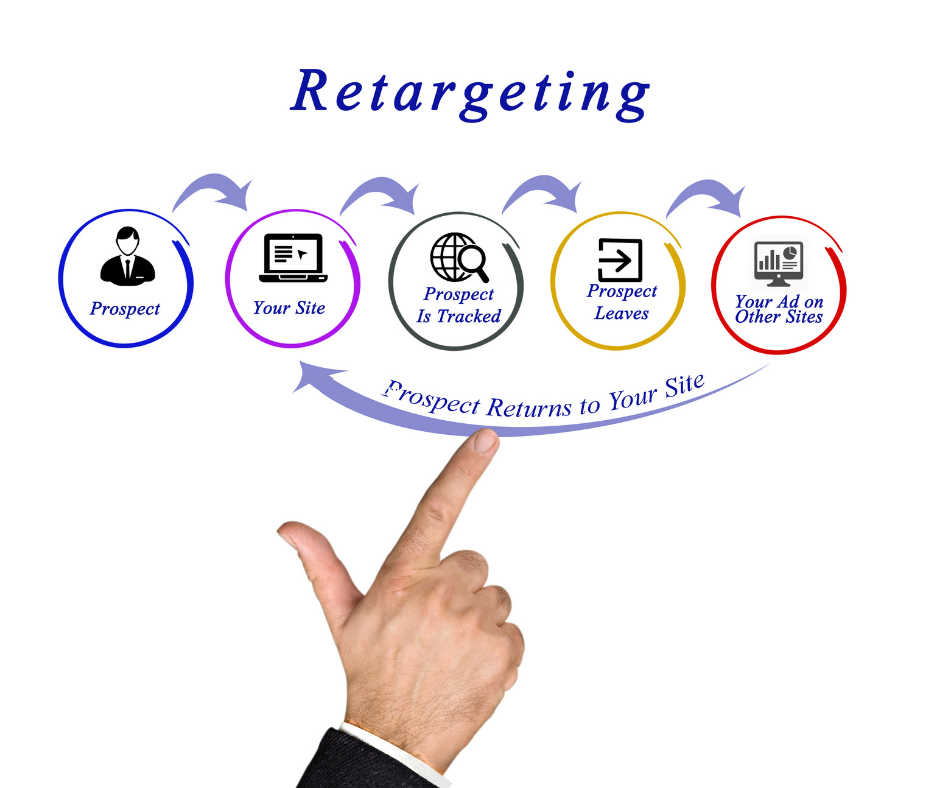
    Retargeting Ads are ads that follow your potential customers across the web. If someone visited your product page but didn’t make a purchase, a retargeting ad can show them that exact product again while they scroll Facebook, watch YouTube, or browse another website.

    These ads keep your brand at the top of the mind and significantly improve conversion rates.

    Also Read: Ultimate Guide to Supply Chain Management in 5 Minutes | What Is Supply Chain Management?

    Retargeting Ads

    Key Benefits:

    • Reconnect with users who already showed interest
    • Increase conversions with warm traffic
    • Enhance brand recall and visibility
    • Reduce abandoned cart rates
    • Boost ROI of ad spend

    How Retargeting Works in Google Ads

    Google Ads offers powerful retargeting options through Display Network, Search Network, YouTube, and even Gmail ads. The process is relatively simple:

    1. Install the Google Ads Tag (Global Site Tag)
    2. Create audiences based on user behavior (e.g. visited product page, abandoned cart)
    3. Design customized ads targeting those audience lists
    4. Launch retargeting campaign across Google’s Display or Search Network

    Google even allows you to upload your customer email lists for retargeting across their properties.

    Types of Retargeting in Google Ads

    1. Standard Website Retargeting

    Tracks all visitors and serves ads to bring them back.

    2. Dynamic Retargeting

    Serves product-specific ads to users based on what they viewed on your website. Ideal for eCommerce.

    3. Search Retargeting

    Targets people who have searched for specific terms but did not convert.

    4. YouTube Retargeting

    Shows video ads to users who viewed your channel or interacted with your videos.

    5. App Retargeting

    Targets users who installed or interacted with your mobile app.

    6. Customer List Retargeting

    Uploads email lists to show ads to known customers across Google platforms.

    Also Read: What Is A Proxy & Proxy Server? | Understand Proxies In 5 Minutes!
    Retargeting Ads

    Step-by-Step Guide: How to Set Up Retargeting Ads in Google Ads

    Step 1: Install Google Ads Tag

    • Go to Google Ads > Tools > Audience Manager > Audience Sources
    • Set up the Google Ads tag (Global Site Tag) on your website
    • Optionally, add dynamic remarketing parameters

    Step 2: Create Audience Lists

    • Audience > Segments > Website Visitors
    • Choose criteria like “Visited product page”, “Abandoned cart”, “Spent more than 3 minutes”, etc.

    Step 3: Build Campaign

    • Choose Display, Search, or YouTube Campaign
    • Set objective as Sales, Leads, or Brand Awareness
    • Under Audience Segments, select your retargeting list

    Step 4: Design Ad Creatives

    • Make personalized ad creatives for the audience
    • Use product images, testimonials, offers, urgency
    • Include strong CTAs like “Come Back Now”, “Finish Your Purchase”

    Step 5: Launch and Optimize

    • Set budget, locations, and bidding strategies
    • Monitor CTR, conversions, cost per conversion
    • A/B test creatives, audience segments, and frequency

    Also Read: Web 3.0 Explained In 5 Minutes: A Beginner’s Guide to Web3
    Retargeting Ads

    Best Practices for Retargeting Ads

    1. Segment Your Audiences: Don’t treat all visitors the same. Segment them by behavior.
    2. Cap Ad Frequency: Avoid overwhelming users. Use frequency capping to control ad exposure.
    3. Use Dynamic Ads: Especially for eCommerce; auto-pulls products viewed by the user.
    4. Add Exclusion Lists: Exclude users who already converted.
    5. Test Multiple Creatives: Use A/B testing to refine ad performance.
    6. Use Limited-Time Offers: Create urgency with deadlines.

    Real-World Example: CWK Agency Retargeting Strategy

    At CWK Agency, we implemented a retargeting strategy for an online course provider:

    • Visitors to the course landing page were segmented by time spent and page scroll depth.
    • Custom audiences were created for cart abandoners.
    • Dynamic ads were shown across YouTube and Display network with a 10% discount offer.
    • Conversion rate increased by 34% in 2 weeks.

    Lesson: Data-based segmentation + customized offers = winning retargeting ads.

    How Retargeting Complements Your Overall SEM Strategy

    While search ads bring new users, retargeting ads bring them back and improve lifetime value. A balanced SEM strategy must include:

    • Google Search Ads (New customer acquisition)
    • Display Ads (Brand awareness)
    • Video Ads (Engagement)
    • Retargeting Ads (Conversion boost and recovery)

    By combining all of these, businesses achieve greater returns and more control over the user journey.

    Advanced Retargeting Strategies

    1. Time-Based Retargeting

    Target users based on how long ago they visited. E.g., “1-3 days” vs. “15-30 days”.

    2. Sequential Retargeting

    Show different messages in a series to guide users through the funnel.

    3. Cross-Platform Retargeting

    Show ads on web, mobile apps, YouTube, and Gmail.

    4. Retarget Based on Intent

    Use AI/ML tools in Google Ads to predict intent and auto-adjust bids.

    5. Integrate with Email and WhatsApp

    Use CRM lists to sync and retarget across platforms.
    Retargeting Ads

    Common Mistakes to Avoid

    • Retargeting all users with same ads
    • Not excluding converters
    • Ignoring mobile users
    • Using generic creatives
    • Not analyzing performance data

    Tools to Enhance Your Retargeting Ads

    • Google Tag Manager – Tag deployment
    • Google Analytics 4 – Audience insights
    • Looker Studio (Data Studio) – Performance dashboards
    • Canva / Adobe Express – Ad creatives
    • CWK Agency Audit Tool – Custom audit of retargeting campaigns

    Conclusion: Get Back Your Lost Customers with Smart Retargeting

    Retargeting is no longer optional. If you want to get back your lost customers, you need a smart and structured retargeting strategy.

    Using Google Ads and other SEM platforms, you can remind, re-engage, and recover your website visitors. By applying the steps and strategies in this module, you’ll turn bounce rates into business growth.

    This is just one part of our ongoing digital marketing journey with Kamlesh Singad at CWK Agency. Stay tuned for more insights in the next module!

    FAQs

    What are Retargeting Ads in Google Ads?

    Answer: Retargeting Ads are a type of digital advertisement that targets users who have previously visited your website but didn’t convert. Google Ads uses cookies to track these users and display relevant ads across its Display Network, Search Network, YouTube, and more.

    How do Retargeting Ads help to get back lost customers?

    Answer: Retargeting Ads serve personalized content to users who left your website without taking action. By re-engaging them with tailored messages, offers, or product reminders, you significantly increase the chances of converting them into paying customers.

    What’s the difference between retargeting and standard display ads?

    Answer: Standard display ads target a broad audience, while retargeting ads focus only on users who have previously interacted with your brand. Retargeting is more personalized and cost-effective, as it targets warmer leads.

    Is retargeting part of Search Engine Marketing (SEM)?

    Answer: Yes, retargeting is a key component of SEM. It complements your search ads by helping recover users who clicked your ads but didn’t convert. Platforms like Google Ads provide full retargeting capabilities within SEM campaigns.

    What platforms support retargeting with Google Ads?

    Answer: Retargeting in Google Ads works on:

    • Google Display Network (websites, blogs, etc.)
    • Google Search Network
    • YouTube
    • Gmail
    • Google Shopping
    • Mobile Apps (via AdMob)

    How can I set up a Retargeting Ad campaign on Google Ads?

    Answer: To set up a retargeting campaign:

    1. Install the Google Ads tag on your website.
    2. Create custom audience lists based on user behavior.
    3. Build a new Display, Search, or YouTube campaign.
    4. Add your retargeting audience.
    5. Launch and optimize your campaign regularly.

    What’s dynamic retargeting and how is it different?

    Answer: Dynamic retargeting shows users personalized ads with the exact products they viewed on your website. It uses your product feed to automatically generate relevant ad creatives, making it highly effective for eCommerce businesses.

    How long should I run retargeting ads for each user?

    Answer: The ideal duration is 7–30 days, depending on your sales cycle. Use shorter durations for time-sensitive offers and longer for high-ticket products. Frequency capping is essential to avoid ad fatigue.

    What budget is recommended for retargeting campaigns?

    Answer: Start with a small daily budget (e.g., ₹500–₹1,000/day) and scale up based on performance. Retargeting is generally more cost-effective than cold audience targeting, offering a higher ROI.

    Can I run retargeting ads without a website?

    Answer: You need some form of digital presence (like a website or landing page) to track users and build audience lists. However, you can also use YouTube channel views, app installs, or email lists for retargeting in Google Ads.

    Why should businesses include retargeting in their digital marketing strategy?

    Answer: Retargeting helps businesses maximize the value of their existing traffic. Instead of losing potential customers, retargeting keeps your brand top-of-mind, nurtures leads, and drives them toward conversion with targeted reminders.

    How does CWK Agency implement retargeting strategies?

    Answer: At CWK Agency, under the guidance of Kamlesh Singad, we create customized audience segments, use dynamic creatives, and implement multi-channel retargeting (including YouTube and Display) to maximize client conversions and ROI.

  • Top 50 Google Ads Interview Questions: Your Key to Success

    Top 50 Google Ads Interview Questions: Your Key to Success

    Landing your dream job in the digital marketing industry, especially in the realm of Google Ads, can be a rewarding experience. In this blog post, we’ll dive deep into the top 50 Google Ads interview questions and provide clear, simple explanations with examples to help you ace your interview on your first attempt.

    Part 1: Google Ads Basics

    • What is Google Ads, and how does it work? It operates on a pay-per-click (PPC) model where advertisers bid on keywords. The highest bidder’s ad appears first.
    • What are the different campaign types in Google Ads?
    • Search Campaigns
    • Display Campaigns
    • Video Campaigns
    • Shopping Campaigns
    • App Campaigns
    • Explain Quality Score. Quality Score measures ad and landing page quality. It impacts ad placement and cost. Higher Quality Scores lead to lower costs.
    • What is Ad Rank, and how is it determined? Ad Rank is your ad’s position in search results. It’s calculated as Bid x Quality Score.
    Google Ads Interview Questions

    Part 2: Keyword Research and Targeting

    • What are Broad Match, Phrase Match, and Exact Match keywords?
    • Broad Match: Wide range of related searches.
    • Phrase Match: Specific phrase with words before/after.
    • Exact Match: Exact keyword or close variations.
    • How can negative keywords improve ad targeting? Negative keywords exclude irrelevant searches, saving budget.
    • Explain Keyword Match Type and its impact. Match types determine how closely a search query must match a keyword. “Exact match” ensures high relevance.

    3: Ad Creation and Optimization

    • What are the essential elements of a Google Ads text ad? Headline, description, display URL.
    • What are Responsive Search Ads? Ads with multiple headlines and descriptions tested by Google’s algorithm.
    • Explain Ad Scheduling. Ad Scheduling lets you specify when ads run.
    • What are Conversion Tracking and why is it important? Conversion Tracking measures actions after ad clicks.

    4: Budgeting and Bidding Strategies

    • What is Cost Per Click (CPC)? CPC is the amount paid per ad click.
    • What is a Daily Budget? The daily maximum ad spend.
    • What is Enhanced Cost Per Click (eCPC) bidding? It automatically adjusts bids for conversions.
    • What is Target CPA bidding? Bids are adjusted to achieve a specific cost per conversion.
    • What is ROAS (Return on Ad Spend)? It measures revenue compared to ad spend.

    5: Ad Performance Analysis and Optimization

    • What is Click-Through Rate (CTR)? CTR is the percentage of users who click on an ad.
    • What is Conversion Rate? Conversion Rate measures the percentage of users who complete a desired action.
    • Explain Impression Share.
    • What is A/B testing? A/B testing involves running two versions of an ad simultaneously.
    • How can the Search Terms report optimize campaigns? It shows the actual search queries that triggered ads.

    6: Ad Campaign Management and Advanced Strategies

    • What are Dynamic Search Ads (DSA)? DSA generates ad content based on website content.
    • What is the Google Display Network (GDN)? GDN is a network of websites and apps for displaying ads.
    • Explain Remarketing and its benefits. Remarketing targets users who previously visited your website.
    • What is Google Ads Editor? Google Ads Editor is a desktop tool for campaign management.
    • How do Quality Score and Ad Rank relate to Ad Extensions? Quality Score and Ad Rank consider ad extension relevance.
    Google Ads Interview Questions

    7: Google Ads Policies and Compliance

    • What are Google Ads Policies, and why must advertisers adhere to them? Policies ensure a safe and positive user experience.
    • How can you prevent ad disapprovals? Review and adhere to Google’s advertising guidelines.
    • What is Click Fraud, and how can advertisers protect themselves? Click Fraud is malicious clicking; protection involves monitoring and prevention.
    • How can advertisers ensure GDPR compliance? GDPR compliance involves data protection and user consent.

    8: Case Studies and Real-Life Scenarios

    • Provide a case study highlighting the importance of effective keyword research. Effective research led to a 30% increase in bookings for a travel agency.
    • Share a success story where ad optimization improved ROI significantly. A/B testing increased conversion rates by 20% for an e-commerce store.
    • Discuss a scenario where negative keywords reduced ad spend. Adding “cheap” and “used” as negatives reduced spend by 15%.
    • Share an example of effective ad scheduling targeting a specific audience. Ad scheduling increased dine-in reservations by 25% for a restaurant.
    • Describe a case where remarketing boosted conversions. Remarketing increased cart recoveries by 30% for an e-commerce store.

    9: Advanced Google Ads Topics

    • What are Google Ads Scripts and how can they automate tasks? Google Ads Scripts automate bid adjustments, reporting, and more.
    • Explain Attribution Modeling in Google Ads. Attribution Modeling assigns value to touchpoints in the customer journey.
    • What are Google Ads Custom Audiences, and how are they created? Custom Audiences target specific user groups based on behavior.
    • How can ad personalization be achieved using Google Ads Scripts? Scripts can personalize ad content based on user behavior.
    • What is Smart Bidding, and how does it work? Smart Bidding uses machine learning to optimize bids for conversions.

    10: Preparing for Your Google Ads Interview

    • How can you stay updated with Google Ads trends and updates? Follow official blog and industry newsletters.
    • What are common interview mistakes to avoid? Avoid not understanding basics, not providing clear examples, and being overly theoretical.
    • How can you showcase problem-solving skills in an interview? Discuss real challenges faced in campaigns, analysis, and optimization.
    • What is the significance of soft skills in an interview? Soft skills like communication and adaptability are vital.

    Conclusion

    Acing a Google Ads interview on your first attempt requires a solid understanding of fundamentals, advanced concepts, and practical experience. Best of luck with your interview, and may your digital marketing career reach new heights!

    Google Ads Interview Questions
  • Google ads vs Facebook ads which one is better?

    Google ads vs Facebook ads which one is better?

    In today’s digital age, advertising has evolved beyond traditional methods.

    Two of the most prominent and influential players in the online advertising arena are Google Ads and Facebook Ads. These platforms offer distinct advantages and cater to different marketing goals. In this comprehensive guide, we will compare Google Ads and Facebook Ads to help you determine which one is better for your business.

    Understanding Google Ads

    Google Ads, formerly known as Google AdWords, is Google’s online advertising platform. It operates on a pay-per-click (PPC) model,

    where advertisers bid on keywords to display ads in Google’s search results and on various partner websites. Google Ads primarily serves ads to users who are actively searching for specific products or services.

    Key Features of Google Ads

    1. Keyword Targeting: Advertisers can choose specific keywords related to their business, and when users search for those keywords, their ads appear in the search results.
    2. Ad Formats: Google offers various ad formats, including text ads, display ads, shopping ads, and video ads, to suit different marketing objectives.
    3. Budget Control: Advertisers can set daily budgets, bid amounts, and maximum costs per click (CPC), allowing for precise budget management.
    4. Advanced Targeting Options: Google Ads provides detailed targeting options, such as location, demographics, and device type, to reach a highly specific audience.
    5. Conversion Tracking: Businesses can track conversions and measure the effectiveness of their campaigns, helping optimize ad spend.
    6. Google Display Network: This feature extends ad reach to a vast network of partner websites, blogs, and apps, increasing brand visibility.

    Understanding Facebook Ads

    Facebook Ads is Facebook’s advertising platform that enables businesses to reach their target audience on Facebook and Instagram. Unlike Google Ads, Facebook Ads serves ads to users based on their interests, behavior, and demographics, allowing for a more audience-centric approach.

    Key Features of Facebook Ads

    1. Audience Targeting: Advertisers can target users based on factors such as age, gender, location, interests, and behavior, creating highly customized campaigns.
    2. Ad Formats: Facebook offers a variety of ad formats, including image ads, video ads, carousel ads, and more, making it suitable for different content types.
    3. Budget Flexibility: Advertisers can set daily or lifetime budgets and choose between CPC, CPM (cost per thousand impressions), or CPA (cost per acquisition) bidding.
    4. Instagram Integration: With Facebook Ads, you can also promote your business on Instagram, which is especially popular among younger audiences.
    5. Pixel Tracking: Facebook’s Pixel allows businesses to track user interactions on their websites, helping measure the impact of their ad campaigns.
    6. Dynamic Ads: These automatically show the most relevant products to users who have previously visited your website, enhancing retargeting efforts.

    Comparing Google Ads and Facebook Ads

    Now that we have a basic understanding of both platforms, let’s delve deeper into the comparison to help you decide which one aligns better with your business goals.

    1. Intent vs. Discovery

    Google Ads: Google Ads excels in capturing users with a high intent to purchase. When someone searches for “buy running shoes,” an ad for a sports store selling running shoes can appear at the top of the search results. This is known as capturing “demand” traffic.

    Facebook Ads: Facebook Ads are more about discovery. They show ads to users who may not be actively searching for a specific product but are interested in related topics. For example, if you sell gourmet coffee, you can target users who follow coffee-related pages or have expressed interest in artisanal beverages.

    Example: If you’re running a small coffee roastery and want to attract local coffee enthusiasts actively looking for specialty beans, Google Ads may be the better choice. On the other hand, if you’re launching a new coffee brand and want to build awareness and engagement, Facebook Ads might be more effective in reaching a broader audience.

    2. Targeting Options

    Google Ads: While Google Ads offers detailed targeting options, it primarily relies on keywords and user search behavior. It is great for reaching users actively seeking specific products or services.

    Facebook Ads: Facebook Ads offer unparalleled targeting options. You can pinpoint your audience based on demographics, interests, behavior, and even their past interactions with your brand.

    Example: If you run an e-commerce store selling athletic wear for women, you can use Facebook Ads to target women aged 25-35 who have shown an interest in fitness and yoga, aligning perfectly with your product offering. Google Ads, in this case, might not be as precise in reaching your desired audience.

    3. Ad Formats

    Google Ads: Google provides various ad formats, including text, display, shopping, and video ads. Text ads are ideal for search results, while display and video ads are suitable for brand awareness and visual storytelling.

    Facebook Ads: Facebook offers a wide range of ad formats, from image and video ads to carousel ads and canvas ads. This diversity allows you to craft engaging ad campaigns that align with your content strategy.

    Example: If you’re promoting a new clothing collection, you can use Facebook’s carousel ad format to showcase multiple products in a single ad, providing a visually appealing and interactive experience. Google Ads’ text-based format, while effective, may not offer the same level of engagement for showcasing a product line.

    4. Budget and Bidding

    Google Ads: Google Ads offers precise budget control, allowing you to set daily budgets, maximum CPC bids, and more. You pay when someone clicks on your ad, making it a suitable choice for businesses with a specific ROI goal in mind.

    Facebook Ads: Facebook offers flexibility in budgeting, allowing you to set daily or lifetime budgets. You can choose between CPC, CPM, or CPA bidding, depending on your campaign objectives.

    Example: If you’re running a limited-time promotion and want to ensure every click leads to a purchase, Google Ads’ CPC model may be preferred. Conversely, if you’re focused on generating brand awareness and impressions, Facebook Ads’ CPM model might be more suitable.

    5. Ad Placement

    Google Ads: Your ads on Google can appear in search results, on websites within the Google Display Network, on YouTube, and in mobile apps. You have control over ad placement to some extent.

    Facebook Ads: Your ads on Facebook can appear in users’ news feeds, Instagram feeds, in the right column of the desktop version, and even in Messenger. Facebook automatically optimizes ad placement based on your campaign objective.

    Example: If you’re a mobile game developer looking to promote your latest game, Facebook Ads can place your video ad within the Facebook and Instagram feeds of users who are likely to enjoy gaming. This offers a seamless and engaging experience for potential players. Google Ads can also promote your game on YouTube, targeting users interested in gaming content.

    6. Ad Tracking and Analytics

    Google Ads: Google Ads provides robust tracking and analytics tools, including conversion tracking, Google Analytics integration, and detailed reports on ad performance. This helps you measure the direct impact of your campaigns on website visits, conversions, and sales.

    Facebook Ads: Facebook’s Pixel allows you to track user interactions on your website, such as page views, add-to-cart actions, and completed purchases. It provides valuable insights into user behavior after clicking on your ads.

    Example: If you’re running an e-commerce store, Google Ads’ conversion tracking can help you determine which keywords and ads are driving the most sales. Facebook’s Pixel, on the other hand, can help you understand the customer journey on your website, identifying drop-off points in the sales funnel.

    7. Ad Performance and ROI

    Google Ads: Google Ads is known for its high intent traffic, which often leads to higher conversion rates. However, the competition for certain keywords can drive up costs per click.

    Facebook Ads: Facebook Ads can be more cost-effective for brand awareness and engagement campaigns. It may take more effort to convert users who are in the early stages of the buying cycle.

    Example: If you’re an insurance company, Google Ads may deliver better ROI for users actively searching for “car insurance quotes.” However, if you’re launching a brand awareness campaign to introduce your insurance services to a wider audience, Facebook Ads might be the better choice to start building your brand presence.

    8. Ad Creativity and Content

    Google Ads: Google Ads’ text-based format requires concise and compelling ad copy. While extensions and ad formats like responsive search ads provide some flexibility, the focus is on the message rather than visual creativity.

    Facebook Ads: Facebook’s ad formats allow for creative visual storytelling. You can use images, videos, and carousels to capture users’ attention and convey your brand message effectively.

    Example: If you’re promoting a luxury travel destination, Facebook Ads can showcase stunning images of the location, creating a desire to explore. Google Ads can complement this by appearing when users search for related terms, reinforcing your brand’s presence.

    9. Mobile Advertising

    Google Ads: Google Ads provides opportunities for mobile advertising, especially through its mobile search and display network. Mobile optimization is crucial for success here.

    Facebook Ads: Facebook and Instagram are highly mobile-centric platforms, making them ideal for mobile advertising. Advertisers can reach users while they’re scrolling through their mobile feeds.

    Example: If you’re launching a mobile app, both platforms can be effective. Facebook Ads can showcase your app with engaging visuals, while Google Ads can target users searching for keywords related to your app’s features.

    10. Remarketing and Retargeting

    Google Ads: Google Ads offers powerful remarketing capabilities, allowing you to show ads to users who have previously visited your website or engaged with your app.

    Facebook Ads: Facebook’s dynamic ads are perfect for retargeting users who have interacted with your brand on the platform or visited your website.

    Example: Google Ads can complement this by targeting users who abandoned their shopping carts with text or display ads.

    Conclusion

    In the Google Ads vs. Facebook Ads debate, there isn’t a one-size-fits-all answer. Here’s a simplified summary to help you decide:

    Choose Google Ads if:

    • You want to capture high-intent users actively searching for your products or services.
    • Your goal is to drive direct conversions and sales.
    • You have a clear understanding of relevant keywords for your industry.

    Choose Facebook Ads if:

    • You want to build brand awareness and engage a broader audience.
    • Your target audience is defined by specific demographics, interests, or behaviors.
    • Visual storytelling and creative content are essential for your campaigns.

    In many cases, the most effective strategy is to use both Google Ads and Facebook Ads in a complementary manner.

    Ultimately, successful digital marketing requires continuous monitoring, testing, and optimization.

    Thank You!

    Read More –

    Why SEO is important for website ?

    Digital Marketing Services in India

    How Digital Marketing Help to Grow Coaching Institutes

  • How Digital Marketing Help to Grow Coaching Institutes

    How Digital Marketing Help to Grow Coaching Institutes

    In today’s digital age, the success of coaching institutes heavily relies on their ability to adapt and excel in the online realm. Traditional marketing strategies alone no longer suffice. Enter digital marketing – a powerful tool that can help coaching institutes not only survive but thrive in this competitive landscape. In this comprehensive guide, we’ll explore how digital marketing can be a game-changer for coaching institutes. We’ll break down complex concepts into simple language, supported by real-world examples to help you understand how to harness the full potential of digital marketing to grow your coaching business.

    Learn how Digital Marketing helps coaching institutes grow by increasing visibility, generating student leads, and boosting enrollments. Discover proven strategies like SEO, social media, and ads to scale your coaching business effectively.

    Chapter 1: Understanding Digital Marketing

    Before we dive into how digital marketing can boost coaching institutes, let’s start with the basics.

    What is Digital Marketing?

    Digital marketing encompasses all marketing efforts that use an electronic device or the internet. It’s the umbrella term for a wide range of online strategies and tactics aimed at connecting with potential students and nurturing them into paying customers.

    Why Digital Marketing?

    Digital marketing offers numerous advantages, including:

    1. Cost-Efficiency: Compared to traditional advertising channels like print and TV, digital marketing is often more cost-effective.
    2. Precise Targeting: It allows you to target specific demographics, ensuring your message reaches the right audience.
    3. Measurable Results: Digital marketing tools provide data on performance, enabling you to make data-driven decisions and optimize your campaigns.
    4. Global Reach: With the internet, you can reach students not only locally but also globally.
    Digital Marketing

    Chapter 2: Building a Strong Online Presence

    The foundation of a successful digital marketing strategy for coaching institutes is a strong online presence. Here’s how to get started:

    1. Website Development

    Your website is your virtual campus. Make sure it’s user-friendly, informative, and visually appealing. Showcase your coaching programs, faculty, success stories, and contact information.

    Example: Khan Academy

    Khan Academy’s website is a prime example of simplicity and effectiveness. It offers free educational content, making it an excellent resource for students and parents.

    2. Search Engine Optimization (SEO)

    SEO is the process of optimizing your website to rank higher in search engine results. Implementing relevant keywords and creating valuable content can help improve your website’s visibility.

    Example: Coursera

    Coursera’s SEO strategy has allowed it to dominate the online education space. A search for “online courses” will likely lead you to Coursera.

    3. Content Marketing

    Creating and sharing valuable content such as blogs, videos, and infographics can establish your coaching institute as an authority in your niche.

    Example: Byju’s

    Byju’s, an Indian ed-tech company, publishes engaging educational content on various platforms. Their YouTube channel features lessons, making learning fun and accessible.

    Chapter 3: Social Media Marketing

    Social media platforms are fertile ground for reaching and engaging with your target audience.

    1. Choose the Right Platforms

    Identify which social media platforms your target audience frequents. For instance, if you’re coaching for competitive exams, platforms like LinkedIn and YouTube might be more effective than Instagram or TikTok.

    Example: The Princeton Review

    The Princeton Review maintains an active presence on LinkedIn, offering valuable content to professionals looking to advance their careers.

    2. Content Strategy

    Create and share content that resonates with your audience. Share success stories, tips, and informative posts related to your niche.

    Example: Udacity

    Udacity’s Twitter account is a blend of informative posts about technology trends and stories of students who have achieved career success with their courses.

    3. Paid Advertising

    Consider investing in paid advertising on social media platforms. Targeted ads can reach a broader audience and drive traffic to your website or enrollment pages.

    Example: Khan Academy

    Khan Academy often runs Facebook ads, promoting their free educational resources to a wider audience.

    Digital Marketing

    Chapter 4: Email Marketing

    Email marketing remains one of the most effective ways to nurture leads and convert them into paying students.

    1. Building an Email List

    Collect email addresses through your website, social media, and events. Offer incentives like e-books or newsletters to encourage sign-ups.

    Example: Coursera

    Coursera offers a free trial and encourages users to sign up with their email to access a wide range of courses.

    2. Personalized Email Campaigns

    Segment your email list based on user behavior and preferences. Send personalized emails with relevant content and offers.

    Example: Duolingo

    Duolingo’s emails include tailored language learning exercises and reminders to keep users engaged.

    3. Automation

    Use email marketing automation tools to send timely emails, such as welcome messages, course recommendations, and follow-ups.

    Example: edX

    edX sends automated reminders to students about upcoming course deadlines and offers course recommendations based on their interests.

    Chapter 5: Pay-Per-Click (PPC) Advertising

    PPC advertising allows you to display ads on search engines and other platforms, paying only when a user clicks on your ad.

    1. Google Ads

    Google Ads is a powerful platform for coaching institutes. You can bid on keywords related to your courses to appear at the top of search results.

    Example: Kaplan

    Kaplan uses Google Ads to appear at the top of search results for keywords like “MCAT prep courses.”

    2. Facebook and Instagram Ads

    These platforms allow you to target users based on their interests, demographics, and behavior. Create visually appealing ads to capture attention.

    Example: Udemy

    Udemy uses Facebook and Instagram ads to promote its vast selection of online courses.

    3. Remarketing

    Remarketing involves showing ads to users who have visited your website but didn’t enroll. It’s a powerful way to re-engage potential students.

    Example: Udacity

    Udacity uses remarketing to remind users about the courses they viewed but didn’t enroll in, encouraging them to return and complete their enrollment.

    Chapter 6: Influencer Marketing

    Leverage influencers in your niche to promote your coaching institute.

    1. Identify Relevant Influencers

    Find influencers whose audience aligns with your target demographic. Reach out to them for collaborations.

    Example: MasterClass

    MasterClass partners with well-known experts and celebrities to teach various courses, attracting a broad audience.

    2. Collaborate on Content

    Work with influencers to create engaging and informative content that showcases your coaching institute’s strengths.

    Example: LinkedIn Learning*

    LinkedIn Learning collaborates with industry experts and influencers to create courses that cater to professionals seeking career growth.

    3. Measure Impact

    Track the performance of influencer marketing campaigns to ensure they deliver a positive return on investment (ROI).

    Example: LinkedIn Learning*

    LinkedIn Learning likely evaluates the success of influencer partnerships by monitoring course enrollments and engagement levels.

    Chapter 7: Analytics and Data-driven Decision Making

    One of the significant advantages of digital marketing is the wealth of data it provides.

    1. Google Analytics

    Use tools like Google Analytics to monitor website traffic, user behavior, and conversion rates.

    Example: Khan Academy

    Khan Academy likely uses Google Analytics to track user engagement with their educational content.

    2. Social Media Insights

    Platforms like Facebook and Instagram offer insights into the performance of your social media posts and ads.

    Example: Byju’s

    Byju’s can analyze social media insights to determine which types of content resonate best with their audience.

    3. A/B Testing

    Experiment with different ad copies

    , images, and landing pages to determine what works best.

    Example: Coursera

    Coursera might run A/B tests to optimize its course landing pages and increase conversion rates.

    Chapter 8: Online Reputation Management

    Your coaching institute’s online reputation can significantly impact its success.

    1. Reviews and Ratings

    Encourage satisfied students to leave positive reviews and ratings on platforms like Google, Yelp, and Trustpilot.

    Example: Kaplan

    Kaplan features positive student testimonials on its website, reinforcing its credibility.

    2. Addressing Negative Feedback

    Respond professionally to negative feedback and take steps to resolve issues to demonstrate your commitment to student satisfaction.

    Example: Udemy

    Udemy actively engages with users who leave negative feedback, offering solutions and seeking to improve their experience.

    3. Showcase Achievements

    Highlight your coaching institute’s achievements, such as high exam pass rates or student success stories.

    Example: The Princeton Review

    The Princeton Review proudly displays its high average score improvements and success stories on its website.

    Chapter 9: Mobile Marketing

    With the increasing use of smartphones, optimizing your marketing for mobile is crucial.

    1. Mobile-Friendly Website

    Ensure your website is responsive and offers a seamless experience on mobile devices.

    Example: Udacity

    Udacity’s website is mobile-friendly, providing an excellent user experience on smartphones.

    2. Mobile Apps

    Consider developing a mobile app for your coaching institute. Apps can offer additional learning resources and engagement opportunities.

    Example: Duolingo*

    Duolingo’s mobile app provides convenient language learning on the go, attracting millions of users worldwide.

    3. SMS Marketing

    Send targeted SMS messages to students about course updates, events, and special offers.

    Example: Coursera

    Coursera occasionally sends SMS notifications to users about new courses and discounts.

    Chapter 10: Staying Updated

    The digital marketing landscape is constantly evolving. It’s essential to stay informed about the latest trends and technologies.

    1. Continuous Learning

    Invest in the ongoing education of your marketing team or consider outsourcing to agencies with expertise in digital marketing.

    Example: HubSpot Academy*

    HubSpot offers free courses on digital marketing, making it easy for marketing professionals to stay updated.

    2. Networking and Conferences

    Attend industry conferences and connect with experts to gain insights into emerging trends.

    Example: MozCon*

    MozCon is a well-known conference in the digital marketing industry, featuring presentations from leading experts.

    3. Monitor Competitors

    Keep an eye on your competitors’ digital marketing strategies and adapt as needed.

    Example: Udemy*

    Udemy likely monitors competitors’ course offerings and pricing to stay competitive.

    Conclusion

    In today’s digital age, digital marketing is not an option but a necessity for coaching institutes looking to grow and succeed. By building a strong online presence, leveraging social media, harnessing the power of email marketing, and utilizing paid advertising, analytics, influencer marketing, and more, coaching institutes can connect with their target audience and thrive in the competitive education industry.

    Remember, digital marketing is not a one-size-fits-all solution. Each coaching institute is unique, and your digital marketing strategy should reflect your institution’s values, strengths, and goals. With continuous learning and adaptation, you can harness the full potential of digital marketing to drive growth and success for your coaching institute in the digital age,help digital marketing to grow .

    Thank You!

    Read More –

    Top 10 niche to create youtube channels and earn passive income

    Why SEO is important for website ?

    Digital Marketing Services in India