Tag: PPC Ads

  • Retargeting Ads: Get Back Your Lost Customers | Part-24

    Retargeting Ads: Get Back Your Lost Customers | Part-24

    Module 4: Google Ads / SEM

    In today’s competitive digital landscape, most website visitors do not convert on their first visit. According to various studies, only around 2% of users convert on their first interaction with your website. So what happens to the other 98%? Do they vanish forever? Not if you understand the power of Retargeting Ads.

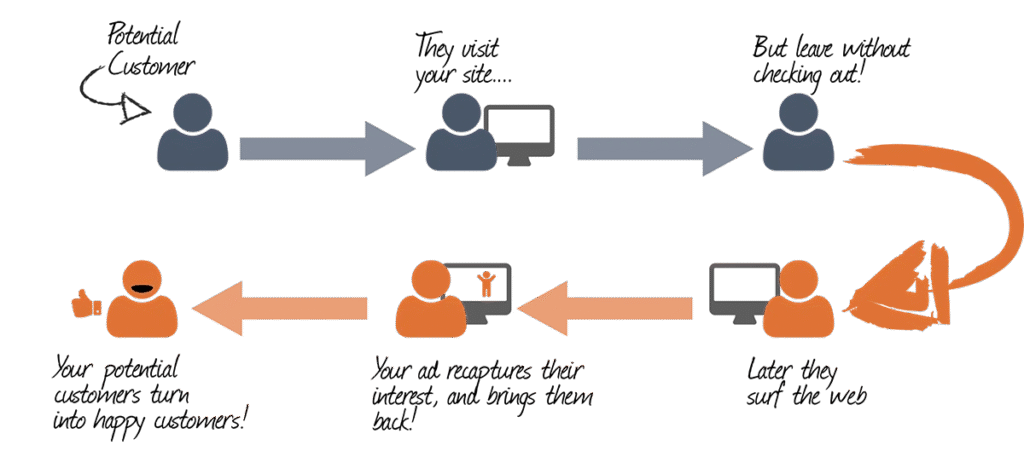
    Retargeting Ads (also known as remarketing) are a type of Search Engine Marketing (SEM) strategy used to get back your lost customers by displaying personalized ads to users who have previously visited your website or interacted with your content.

    This module from the Digital Marketing Course by Kamlesh Singad at CWK Agency will break down everything you need to know about retargeting ads on Google Ads, including step-by-step setup, best practices, and advanced strategies for maximum ROI.

    What Are Retargeting Ads?

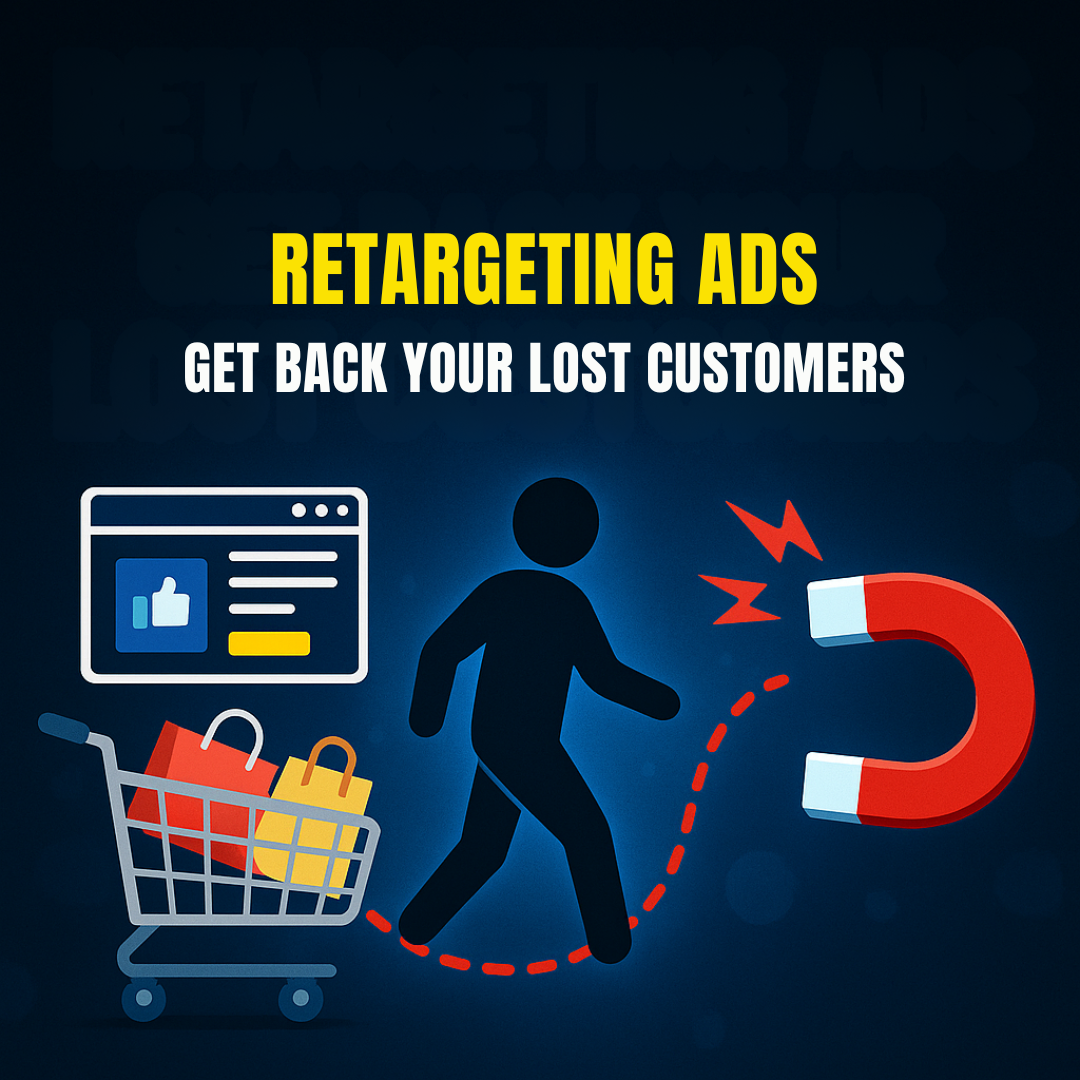
    Retargeting Ads are ads that follow your potential customers across the web. If someone visited your product page but didn’t make a purchase, a retargeting ad can show them that exact product again while they scroll Facebook, watch YouTube, or browse another website.

    These ads keep your brand at the top of the mind and significantly improve conversion rates.

    Also Read: Ultimate Guide to Supply Chain Management in 5 Minutes | What Is Supply Chain Management?

    Retargeting Ads

    Key Benefits:

    • Reconnect with users who already showed interest
    • Increase conversions with warm traffic
    • Enhance brand recall and visibility
    • Reduce abandoned cart rates
    • Boost ROI of ad spend

    How Retargeting Works in Google Ads

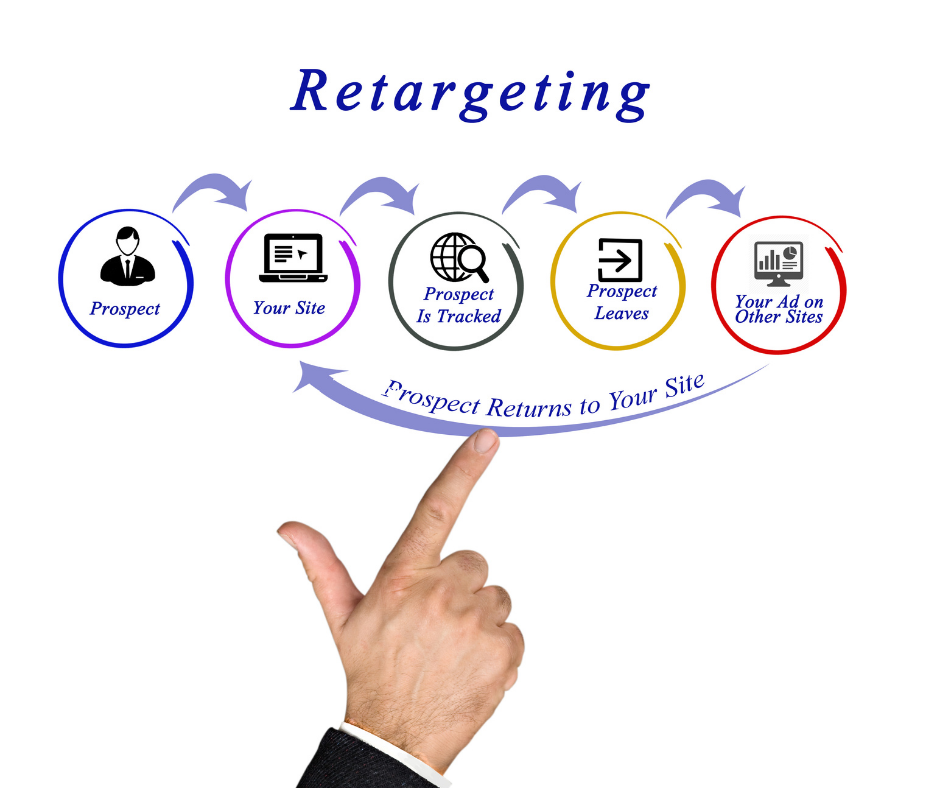
    Google Ads offers powerful retargeting options through Display Network, Search Network, YouTube, and even Gmail ads. The process is relatively simple:

    1. Install the Google Ads Tag (Global Site Tag)
    2. Create audiences based on user behavior (e.g. visited product page, abandoned cart)
    3. Design customized ads targeting those audience lists
    4. Launch retargeting campaign across Google’s Display or Search Network

    Google even allows you to upload your customer email lists for retargeting across their properties.

    Types of Retargeting in Google Ads

    1. Standard Website Retargeting

    Tracks all visitors and serves ads to bring them back.

    2. Dynamic Retargeting

    Serves product-specific ads to users based on what they viewed on your website. Ideal for eCommerce.

    3. Search Retargeting

    Targets people who have searched for specific terms but did not convert.

    4. YouTube Retargeting

    Shows video ads to users who viewed your channel or interacted with your videos.

    5. App Retargeting

    Targets users who installed or interacted with your mobile app.

    6. Customer List Retargeting

    Uploads email lists to show ads to known customers across Google platforms.

    Also Read: What Is A Proxy & Proxy Server? | Understand Proxies In 5 Minutes!
    Retargeting Ads

    Step-by-Step Guide: How to Set Up Retargeting Ads in Google Ads

    Step 1: Install Google Ads Tag

    • Go to Google Ads > Tools > Audience Manager > Audience Sources
    • Set up the Google Ads tag (Global Site Tag) on your website
    • Optionally, add dynamic remarketing parameters

    Step 2: Create Audience Lists

    • Audience > Segments > Website Visitors
    • Choose criteria like “Visited product page”, “Abandoned cart”, “Spent more than 3 minutes”, etc.

    Step 3: Build Campaign

    • Choose Display, Search, or YouTube Campaign
    • Set objective as Sales, Leads, or Brand Awareness
    • Under Audience Segments, select your retargeting list

    Step 4: Design Ad Creatives

    • Make personalized ad creatives for the audience
    • Use product images, testimonials, offers, urgency
    • Include strong CTAs like “Come Back Now”, “Finish Your Purchase”

    Step 5: Launch and Optimize

    • Set budget, locations, and bidding strategies
    • Monitor CTR, conversions, cost per conversion
    • A/B test creatives, audience segments, and frequency

    Also Read: Web 3.0 Explained In 5 Minutes: A Beginner’s Guide to Web3
    Retargeting Ads

    Best Practices for Retargeting Ads

    1. Segment Your Audiences: Don’t treat all visitors the same. Segment them by behavior.
    2. Cap Ad Frequency: Avoid overwhelming users. Use frequency capping to control ad exposure.
    3. Use Dynamic Ads: Especially for eCommerce; auto-pulls products viewed by the user.
    4. Add Exclusion Lists: Exclude users who already converted.
    5. Test Multiple Creatives: Use A/B testing to refine ad performance.
    6. Use Limited-Time Offers: Create urgency with deadlines.

    Real-World Example: CWK Agency Retargeting Strategy

    At CWK Agency, we implemented a retargeting strategy for an online course provider:

    • Visitors to the course landing page were segmented by time spent and page scroll depth.
    • Custom audiences were created for cart abandoners.
    • Dynamic ads were shown across YouTube and Display network with a 10% discount offer.
    • Conversion rate increased by 34% in 2 weeks.

    Lesson: Data-based segmentation + customized offers = winning retargeting ads.

    How Retargeting Complements Your Overall SEM Strategy

    While search ads bring new users, retargeting ads bring them back and improve lifetime value. A balanced SEM strategy must include:

    • Google Search Ads (New customer acquisition)
    • Display Ads (Brand awareness)
    • Video Ads (Engagement)
    • Retargeting Ads (Conversion boost and recovery)

    By combining all of these, businesses achieve greater returns and more control over the user journey.

    Advanced Retargeting Strategies

    1. Time-Based Retargeting

    Target users based on how long ago they visited. E.g., “1-3 days” vs. “15-30 days”.

    2. Sequential Retargeting

    Show different messages in a series to guide users through the funnel.

    3. Cross-Platform Retargeting

    Show ads on web, mobile apps, YouTube, and Gmail.

    4. Retarget Based on Intent

    Use AI/ML tools in Google Ads to predict intent and auto-adjust bids.

    5. Integrate with Email and WhatsApp

    Use CRM lists to sync and retarget across platforms.
    Retargeting Ads

    Common Mistakes to Avoid

    • Retargeting all users with same ads
    • Not excluding converters
    • Ignoring mobile users
    • Using generic creatives
    • Not analyzing performance data

    Tools to Enhance Your Retargeting Ads

    • Google Tag Manager – Tag deployment
    • Google Analytics 4 – Audience insights
    • Looker Studio (Data Studio) – Performance dashboards
    • Canva / Adobe Express – Ad creatives
    • CWK Agency Audit Tool – Custom audit of retargeting campaigns

    Conclusion: Get Back Your Lost Customers with Smart Retargeting

    Retargeting is no longer optional. If you want to get back your lost customers, you need a smart and structured retargeting strategy.

    Using Google Ads and other SEM platforms, you can remind, re-engage, and recover your website visitors. By applying the steps and strategies in this module, you’ll turn bounce rates into business growth.

    This is just one part of our ongoing digital marketing journey with Kamlesh Singad at CWK Agency. Stay tuned for more insights in the next module!

    FAQs

    What are Retargeting Ads in Google Ads?

    Answer: Retargeting Ads are a type of digital advertisement that targets users who have previously visited your website but didn’t convert. Google Ads uses cookies to track these users and display relevant ads across its Display Network, Search Network, YouTube, and more.

    How do Retargeting Ads help to get back lost customers?

    Answer: Retargeting Ads serve personalized content to users who left your website without taking action. By re-engaging them with tailored messages, offers, or product reminders, you significantly increase the chances of converting them into paying customers.

    What’s the difference between retargeting and standard display ads?

    Answer: Standard display ads target a broad audience, while retargeting ads focus only on users who have previously interacted with your brand. Retargeting is more personalized and cost-effective, as it targets warmer leads.

    Is retargeting part of Search Engine Marketing (SEM)?

    Answer: Yes, retargeting is a key component of SEM. It complements your search ads by helping recover users who clicked your ads but didn’t convert. Platforms like Google Ads provide full retargeting capabilities within SEM campaigns.

    What platforms support retargeting with Google Ads?

    Answer: Retargeting in Google Ads works on:

    • Google Display Network (websites, blogs, etc.)
    • Google Search Network
    • YouTube
    • Gmail
    • Google Shopping
    • Mobile Apps (via AdMob)

    How can I set up a Retargeting Ad campaign on Google Ads?

    Answer: To set up a retargeting campaign:

    1. Install the Google Ads tag on your website.
    2. Create custom audience lists based on user behavior.
    3. Build a new Display, Search, or YouTube campaign.
    4. Add your retargeting audience.
    5. Launch and optimize your campaign regularly.

    What’s dynamic retargeting and how is it different?

    Answer: Dynamic retargeting shows users personalized ads with the exact products they viewed on your website. It uses your product feed to automatically generate relevant ad creatives, making it highly effective for eCommerce businesses.

    How long should I run retargeting ads for each user?

    Answer: The ideal duration is 7–30 days, depending on your sales cycle. Use shorter durations for time-sensitive offers and longer for high-ticket products. Frequency capping is essential to avoid ad fatigue.

    What budget is recommended for retargeting campaigns?

    Answer: Start with a small daily budget (e.g., ₹500–₹1,000/day) and scale up based on performance. Retargeting is generally more cost-effective than cold audience targeting, offering a higher ROI.

    Can I run retargeting ads without a website?

    Answer: You need some form of digital presence (like a website or landing page) to track users and build audience lists. However, you can also use YouTube channel views, app installs, or email lists for retargeting in Google Ads.

    Why should businesses include retargeting in their digital marketing strategy?

    Answer: Retargeting helps businesses maximize the value of their existing traffic. Instead of losing potential customers, retargeting keeps your brand top-of-mind, nurtures leads, and drives them toward conversion with targeted reminders.

    How does CWK Agency implement retargeting strategies?

    Answer: At CWK Agency, under the guidance of Kamlesh Singad, we create customized audience segments, use dynamic creatives, and implement multi-channel retargeting (including YouTube and Display) to maximize client conversions and ROI.

  • What is PPC? Pay Per Click Advertising Guide

    What is PPC? Pay Per Click Advertising Guide

    Imagine you have a shop and you want to attract more customers to your website. One way to do this is through something called “Pay Per Click” or PPC.

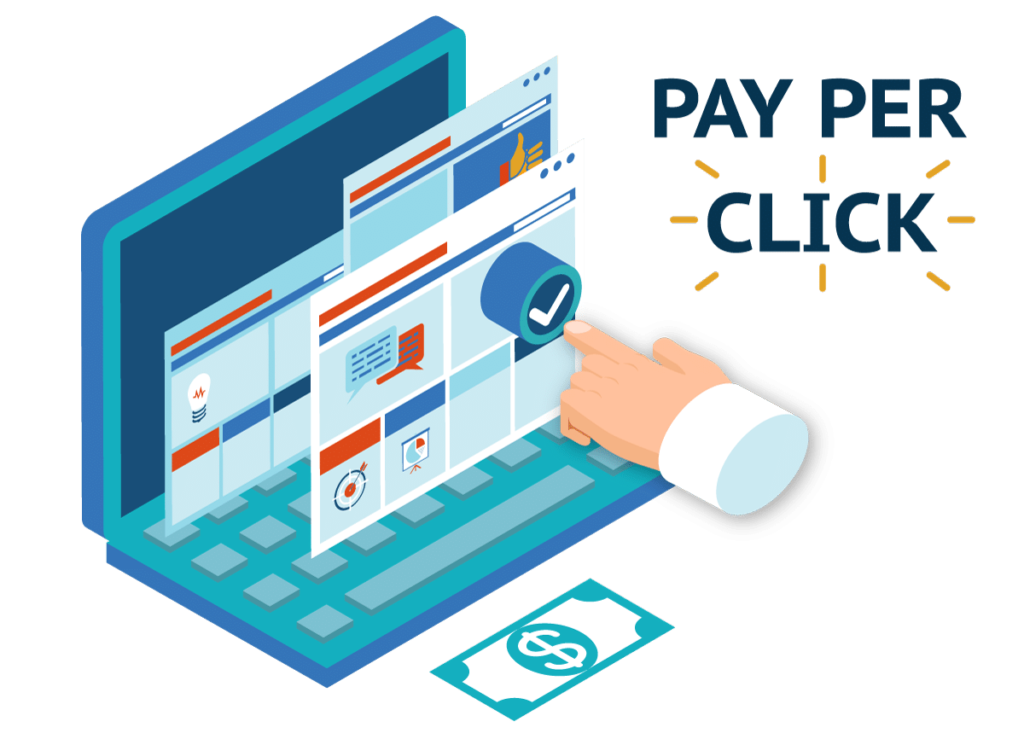
    Think of PPC as a kind of online advertising where you only pay when someone clicks on your ad. It’s like putting up a billboard on a busy street, but you only pay the billboard company when someone actually stops and takes a closer look at your billboard.

    In the online world, PPC works similarly. You create a little ad that shows up when people search for something related to what you offer. These ads usually appear on search engines like Google or on websites. When someone clicks on your ad, they get directed to your website, and you pay a small amount for that click.

    The cool thing about PPC is that you can choose exactly who sees your ad. For instance, if you’re selling sneakers, you can make sure your ad shows up when someone types in “cool sneakers” in a search engine. This means your ad reaches people who are already interested in what you’re selling.

    PPC can be a great way to bring potential customers to your website and hopefully turn them into actual buyers. It’s like paying a small fee for each visitor who walks into your virtual store after being attracted by your online ad. Just remember, it’s important to make sure your ad and website are interesting and relevant to what people are looking for, so they’re more likely to stick around and make a purchase.

    1. What is PPC?

    Definition of PPC: Pay Per Click (PPC) is an online advertising model where advertisers pay a fee each time their ad is clicked. It’s a way to buy visits to your website rather than trying to earn those visits organically.

    How PPC works: Advertisers bid on specific keywords related to their products or services. When someone searches for those keywords, the ads are shown at the top of the search results. If the user clicks on the ad, the advertiser pays the search engine (like Google) for that click.

    Benefits of PPC advertising: It offers immediate visibility in search results, targets specific audiences, provides measurable results, and allows for precise budget control.

    What is PPC

    2. Components of PPC Campaigns:

    Keywords: Keywords are the words or phrases that trigger your ads to appear. For instance, if you sell running shoes, “best running shoes” could be a keyword.

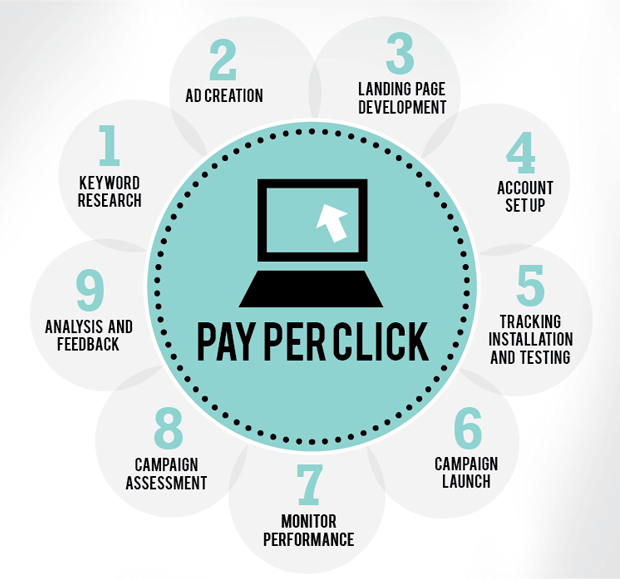
    Ad Copy: This is the text of your advertisement. It should be catchy, relevant to the keyword, and include a call-to-action (CTA). For example, “Shop the latest running shoe collection now!”

    Landing Pages: The page where users are directed after clicking your ad. It should match the ad’s promise and provide a seamless user experience.

    Ad Extensions: These are extra pieces of information added to your ad, like your phone number, location, or links to specific pages on your website.

    Budget and Bidding: You set a daily or monthly budget, and you bid on keywords. The bid amount affects how often your ad appears and where it’s placed on the page.

    3. Setting Up Your PPC Campaign:

    Researching Keywords: Use tools like Google Keyword Planner to find relevant keywords for your business. Focus on keywords with high search volume and relevance to your offerings.

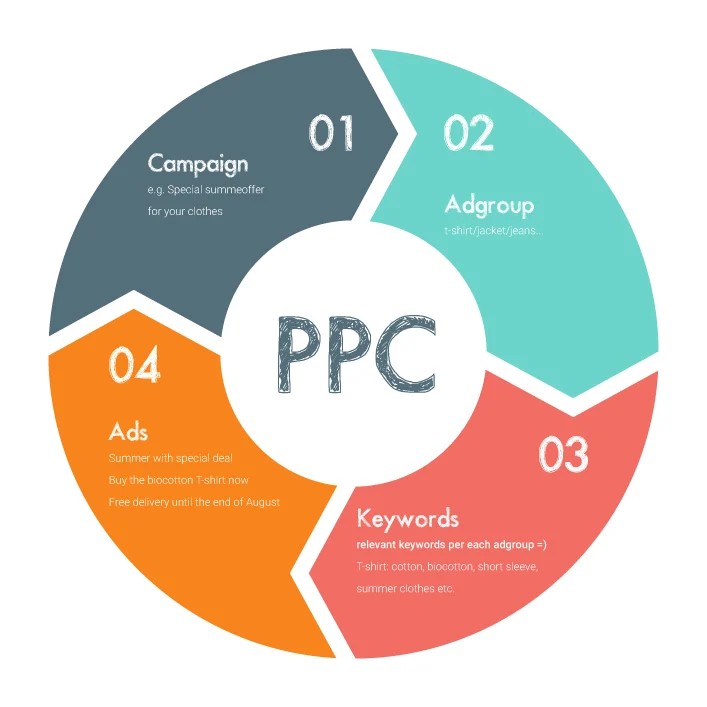
    Campaign Structure: Divide your campaigns into smaller ad groups, each with a specific theme. This helps you tailor your ads and track performance more effectively.

    Ad Platforms: Popular platforms include Google Ads (for search and display ads), Bing Ads (Microsoft’s search engine), and social media platforms like Facebook Ads.

    Targeting Options: Define your target audience by factors like location, demographics, interests, and device types.

    4. Creating Effective Ad Campaigns:

    Writing Compelling Ad Copy: Use action-oriented language, highlight benefits, and create a sense of urgency. For example, “Limited-time offer: 50% off running shoes!”

    Ad Formats: Experiment with different formats, such as text ads, display ads with images, and video ads.

    Ad Quality Score: This is a rating given by platforms like Google to your ads and landing pages. It affects your ad’s position and cost. To improve it, focus on relevance and user experience.

    A/B Testing: Create multiple versions of your ads and test different elements like headlines, descriptions, and images to see what resonates best with your audience.

    5. Keyword Research and Selection:

    Types: Broad match (wide keyword variations), exact match (precise keywords), phrase match (specific phrases), and negative keywords (words you don’t want your ad to appear for).

    Tools: Besides Google Keyword Planner, tools like SEMrush, Ahrefs, and Moz can help you find valuable keywords.

    Long-Tail Keywords: These are longer, more specific phrases. For example, “affordable lightweight running shoes for beginners.”

    6. Managing Bids and Budgets:

    Bid Strategies: Manual Bidding, Automated Bidding, and Bid Adjustments:

    Manual Bidding: With manual bidding, you set the maximum amount you’re willing to pay for a click. It gives you precise control over your bids but requires constant monitoring and adjustments.

    Automated Bidding: Automated bidding uses algorithms to adjust bids based on various factors, such as user behavior and conversion likelihood. It can save time and optimize bids for better results.

    Bid Adjustments: These allow you to modify bids for specific criteria like device type, location, or time of day. For example, you can increase bids for mobile users if your website is mobile-friendly.

    Budget Allocation: Determining How Much to Spend on Each Campaign:

    Start Small: Begin with a modest budget to test different keywords and ads. As you gather data and optimize your campaigns, you can gradually increase your budget.

    Allocate by Campaign Goals: Allocate more budget to campaigns that are driving better results or have higher potential for conversions.

    Consider Seasonality: Adjust your budget based on peak seasons for your business. For instance, if you sell winter clothing, allocate more budget during the colder months.

    Cost-Per-Click (CPC): Understanding the Cost of Each Click:

    Auction-Based Pricing: In PPC, you participate in an auction for ad placement. You’re competing with other advertisers, and the amount you’re willing to pay (your bid) determines your ad’s position.

    Ad Rank: Your ad’s position is determined by your bid, ad quality score, and other factors. A higher ad quality score can lead to a better position at a lower cost.

    Calculating CPC: Your CPC is the actual amount you pay when someone clicks your ad. It’s often lower than your maximum bid because you pay just enough to beat the ad rank of the competitor below you.

    Budget Considerations: Keep an eye on your CPC to ensure it aligns with your budget. If CPC is too high, you might need to adjust your bids or target more specific keywords.

    7. Measuring and Analysing Performance:

    Key Metrics: Click-Through Rate (CTR), Conversion Rate, Quality Score, etc.:

    Click-Through Rate (CTR): CTR measures the percentage of people who click on your ad after seeing it. A higher CTR indicates that your ad is relevant and engaging to users.

    Conversion Rate: Conversion rate shows the percentage of users who take a desired action, like making a purchase or filling out a form, after clicking your ad. It’s a crucial metric for measuring campaign effectiveness.

    Quality Score: This score rates the quality and relevance of your ads, keywords, and landing pages. Higher quality scores can lead to better ad positions and lower CPC.

    Impressions: The number of times your ad is displayed to users. High impressions coupled with low clicks might suggest that your ad needs improvement.

    Conversion Tracking: Monitoring User Actions and Goals:

    Setting Up Goals: Define what actions you want users to take on your website, such as making a purchase or signing up for a newsletter.

    Tracking Codes: Use tracking codes (e.g., Google Analytics) to monitor user behavior. These codes help you see which ads and keywords are driving conversions.

    Attribution: Understand which interactions contributed to conversions. Attribution models (first click, last click, etc.) help you attribute value to different touchpoints.

    Optimizing for Conversions: Analyze data to identify patterns and trends. Focus on campaigns, keywords, and ads that generate the highest conversion rates.

    Analytics Tools: Utilizing Tools like Google Analytics for Deeper Insights:

    Google Analytics: This powerful tool provides detailed insights into user behavior on your website. You can track traffic sources, user demographics, bounce rates, and more.

    Conversion Tracking Platforms: Besides Google Analytics, platform-specific conversion tracking tools like Google Ads Conversion Tracking provide direct insights into campaign performance.

    Data Analysis: Regularly review data to identify trends and anomalies. Adjust your campaigns based on the insights you gain from these tools.

    Continuous Optimization: Use data to make informed decisions about which aspects of your campaigns need improvement. A/B testing different elements can lead to higher conversion rates over time.

    By focusing on these metrics and tools, you can measure the effectiveness of your PPC campaigns and make informed decisions to improve their performance.

    What is PPC

    8. Optimizing Your PPC Campaigns:

    Ad Performance Review: Analysing What’s Working and What Isn’t:

    Regularly assess your campaign’s performance metrics, like CTR, conversion rate, and cost per conversion. Identify which ads and keywords are generating the best results and which ones are underperforming. Pause or adjust ads that aren’t delivering desired results and focus more on successful elements.

    Ad Copy Refinement: Making Improvements Based on Data:

    Experiment with different ad copy variations to see what resonates best with your audience. Analyze the performance of each ad by comparing CTR and conversion rates. Incorporate successful phrases, keywords, and calls-to-action into your ad copy.

    Keyword Adjustments: Adding, Pausing, or Modifying Keywords as Needed:

    • Review the performance of your keywords regularly to identify high-performing and low-performing ones.
    • Add new keywords based on emerging trends or user search behaviors.
    • Pause or remove keywords that are driving irrelevant traffic or not converting.

    Landing Page Optimization: Enhancing User Experience and Conversion Rates:

    Ensure your landing page matches the promise of your ad and provides relevant information. Use clear and compelling headlines, along with engaging visuals. Place your CTA prominently and make the conversion process intuitive and simple.

    Page Load Speed: A slow-loading page can lead to high bounce rates. Optimize images and code to improve loading times.

    Mobile Responsiveness: As many users access sites on mobile devices, make sure your landing page is mobile-friendly.

    A/B Testing: Experiment with different layouts, content, and designs to find the most effective landing page variations.

    Continuous Optimization:

    Optimization is an ongoing process. Regularly review your campaigns, analyze data, and make adjustments. Keep a close eye on industry trends, seasonal changes, and user behavour shifts. Don’t be afraid to try new strategies and learn from both successes and failures.

    9. Advanced PPC Strategies:

    Remarketing: Reaching Out to Previous Website Visitors:

    • Remarketing targets users who have previously visited your website. You can show them tailored ads as they browse other sites.
    • It’s a powerful way to re-engage potential customers who might not have converted during their initial visit.

    Display Advertising: Creating Visually Appealing Banner Ads:

    • Display ads are graphical ads that appear on websites, often in the form of banners or sidebars.
    • Use eye-catching visuals, compelling copy, and a clear call-to-action to entice users to click.

    Video Advertising: Engaging Users with Video Content:

    • Video ads can be shown on platforms like YouTube and social media.
    • Create engaging and concise videos that quickly capture viewers’ attention and communicate your message.

    Geographic Targeting: Focusing on Specific Locations for Local Businesses:

    • Specify where your ads should be shown based on geographical criteria like city, state, or even radius around a location.
    • Ideal for local businesses looking to attract nearby customers.
    • Local Keywords: Use location-specific keywords to connect with users searching for products or services in your area.
    • Location-Specific Messaging: Tailor your ad copy to include references to the local area you’re targeting.
    • Local Landing Pages: If you have multiple business locations, create landing pages specific to each location for a personalized user experience.

    Remember, Advanced Strategies Require Testing and Monitoring:

    • When implementing advanced strategies like remarketing or video ads, closely monitor their performance.
    • A/B test different variations to find the most effective approach.
    • Continuously refine and adjust these strategies based on real-time data.

    Utilizing these advanced strategies can take your PPC campaigns to the next level, helping you reach and engage your target audience more effectively.

    10. Avoiding Click Fraud and Irrelevant Clicks:

    Click Fraud: This occurs when someone clicks on your ads with malicious intent, like trying to deplete your budget or harm your campaign. To prevent click fraud, regularly monitor your campaigns for unusual activity, such as sudden spikes in clicks from the same IP address.

    Invalid Clicks: These are clicks that are unintentional or accidental, often due to user errors. While they may not be malicious, they can still waste your budget. Utilize click tracking and analytics tools to identify patterns of invalid clicks.

    Ad Policy Compliance: Following Platform Guidelines:

    Each PPC platform, such as Google Ads or Facebook Ads, has specific guidelines for ad content, language, images, and landing pages. Failure to comply can result in disapproval or even suspension of your ads or account.

    Budget Management: Preventing Overspending:

    Set a clear budget for each campaign and regularly review your spending. Keep an eye on your daily or monthly expenditure to prevent overspending.

    Ad Copy Tips: Writing Engaging and Relevant Ads:

    Captivating Headlines: Start with attention-grabbing headlines that entice users to read further.

    Unique Selling Proposition (USP): Highlight what sets your product or service apart from the competition.

    Clear Call-to-Action (CTA): Prompt users to take the desired action, whether it’s making a purchase, signing up, or learning more.

    Relevance: Ensure your ad copy directly relates to the user’s search query and the content of your landing page.

    Keywords: Incorporate relevant keywords strategically while maintaining natural-sounding copy.

    Benefits Over Features: Focus on how your product or service benefits the user, rather than just listing features.

    11. future trends in PPC advertising:

    Automation and AI in PPC:

    Automation and AI technologies are becoming more integral in managing PPC campaigns efficiently. Machine learning algorithms can optimize bidding strategies, adjusting bids in real-time based on factors like user behavior and conversion likelihood.

    AI can analyze vast amounts of data to identify trends, patterns, and opportunities that humans might miss.

    Voice Search and PPC:

    As voice assistants like Siri, Google Assistant, and Alexa become increasingly popular, voice search is changing the way people search for information. PPC campaigns need to adapt to voice search queries, which are often longer and more conversational. Long-tail keywords and natural language targeting become crucial for reaching users using voice commands.

    Mobile-Friendly PPC Strategies:

    Mobile devices continue to dominate online activities, including searches and purchases. PPC strategies should prioritize mobile optimization, ensuring landing pages are responsive and load quickly on mobile devices.

    Cross-Channel Integration:

    PPC campaigns are increasingly being integrated with other digital marketing channels like social media, email marketing, and content marketing.

    Privacy and Data Protection:

    Increasing concerns about privacy and data protection are leading to changes in how data is collected and used for advertising.

    Visual and Video Ads:

    Visual and video content is gaining prominence, especially on platforms like Instagram, YouTube, and TikTok.

    Video ads, in particular, are becoming more popular due to their engaging nature and ability to convey information effectively.

    Interactive and Immersive Ads:

    Interactive ads, such as quizzes, polls, and playable ads, are becoming more prevalent, allowing users to engage directly with the ad content.

    Augmented reality (AR) and virtual reality (VR) ads are also emerging as ways to provide immersive experiences to users.

    What is PPC

    12. Conclusion :

    PPC Advertising: Pay Per Click (PPC) is an online advertising model where advertisers pay only when users click on their ads, directing them to their websites.

    Components of PPC Campaigns: PPC campaigns involve keywords, ad copy, landing pages, ad extensions, and budget management.

    Measuring Performance: Key metrics include CTR, conversion rate, quality score, and impressions. Conversion tracking and analytics tools like Google Analytics provide insights.

    Advanced Strategies: Remarketing, display and video ads, geographic targeting, and continuous optimization enhance campaign effectiveness.

    Final Thoughts on the Power of PPC Advertising:

    PPC advertising is a dynamic and impactful tool for businesses:

    1. Targeted Reach: PPC allows precise targeting of specific audiences, ensuring your ads reach those most likely to be interested in your offerings.
    2. Quick Results: Unlike some other marketing efforts, PPC delivers fast results, making it ideal for short-term promotions or new product launches.
    3. Measurable and Trackable: Every aspect of a PPC campaign is measurable, allowing you to track your performance and adjust strategies accordingly.
    4. Scalability: PPC campaigns can be scaled up or down easily based on your business goals and budget.
    5. Flexibility: Ad campaigns can be tailored to suit various goals, whether it’s driving sales, increasing brand awareness, or promoting specific events.
    6. Continuous Learning: PPC advertising encourages ongoing learning and adaptation, helping you stay ahead in the ever-changing digital landscape.

    By understanding and harnessing the power of PPC advertising, businesses can effectively connect with their target audience, drive conversions, and achieve their marketing objectives.

    If you have more inquiries or need further guidance, feel free to ask!