Tag: google ads tutorial

  • Retargeting Ads: Get Back Your Lost Customers | Part-24

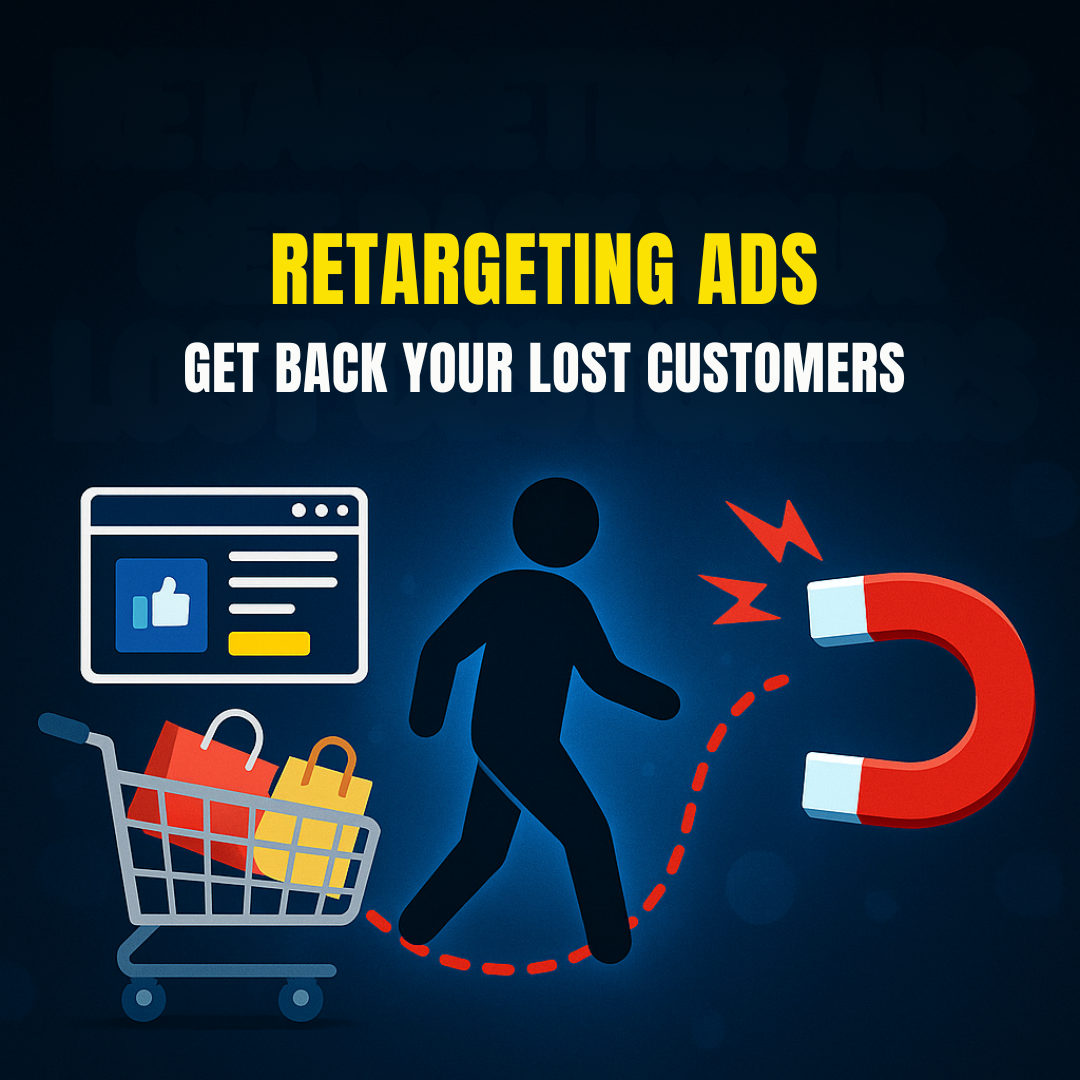
    Retargeting Ads: Get Back Your Lost Customers | Part-24

    Module 4: Google Ads / SEM

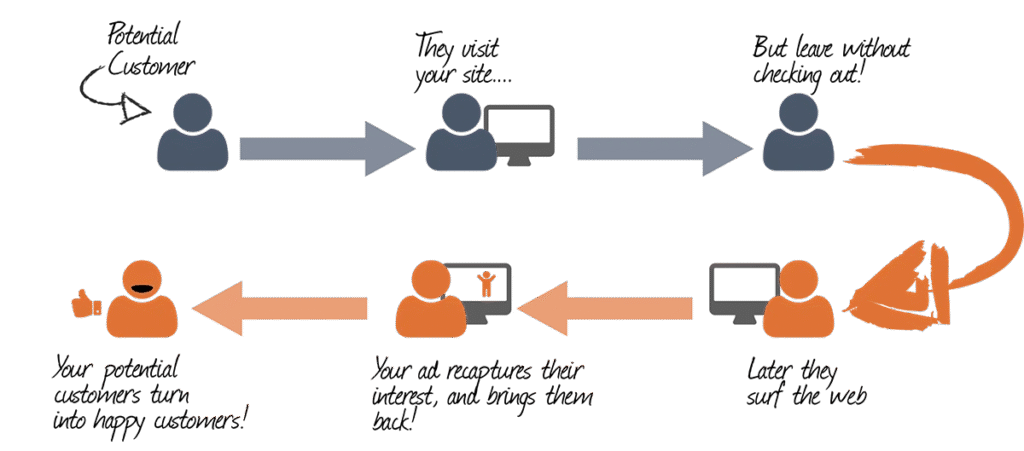
    In today’s competitive digital landscape, most website visitors do not convert on their first visit. According to various studies, only around 2% of users convert on their first interaction with your website. So what happens to the other 98%? Do they vanish forever? Not if you understand the power of Retargeting Ads.

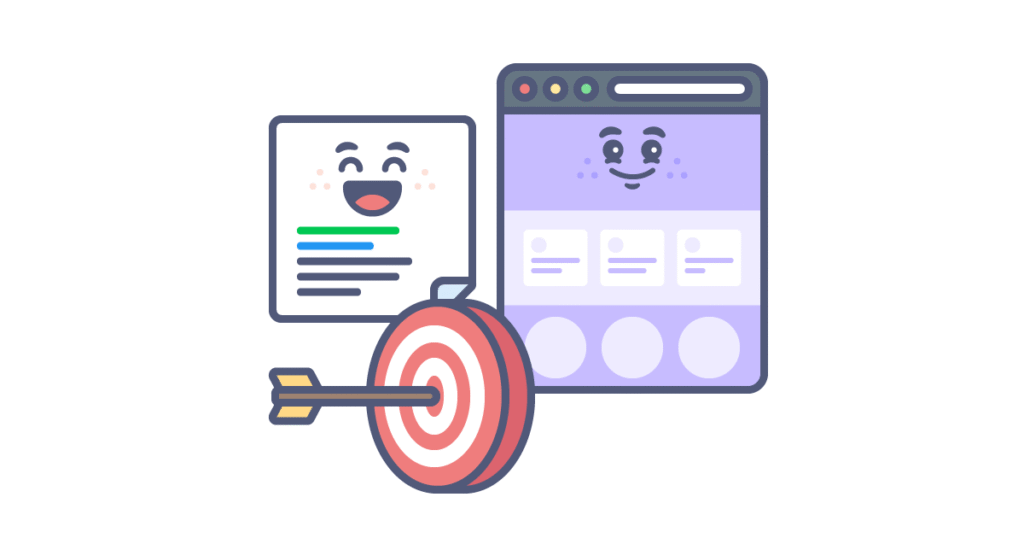
    Retargeting Ads (also known as remarketing) are a type of Search Engine Marketing (SEM) strategy used to get back your lost customers by displaying personalized ads to users who have previously visited your website or interacted with your content.

    This module from the Digital Marketing Course by Kamlesh Singad at CWK Agency will break down everything you need to know about retargeting ads on Google Ads, including step-by-step setup, best practices, and advanced strategies for maximum ROI.

    What Are Retargeting Ads?

    Retargeting Ads are ads that follow your potential customers across the web. If someone visited your product page but didn’t make a purchase, a retargeting ad can show them that exact product again while they scroll Facebook, watch YouTube, or browse another website.

    These ads keep your brand at the top of the mind and significantly improve conversion rates.

    Also Read: Ultimate Guide to Supply Chain Management in 5 Minutes | What Is Supply Chain Management?

    Retargeting Ads

    Key Benefits:

    • Reconnect with users who already showed interest
    • Increase conversions with warm traffic
    • Enhance brand recall and visibility
    • Reduce abandoned cart rates
    • Boost ROI of ad spend

    How Retargeting Works in Google Ads

    Google Ads offers powerful retargeting options through Display Network, Search Network, YouTube, and even Gmail ads. The process is relatively simple:

    1. Install the Google Ads Tag (Global Site Tag)
    2. Create audiences based on user behavior (e.g. visited product page, abandoned cart)
    3. Design customized ads targeting those audience lists
    4. Launch retargeting campaign across Google’s Display or Search Network

    Google even allows you to upload your customer email lists for retargeting across their properties.

    Types of Retargeting in Google Ads

    1. Standard Website Retargeting

    Tracks all visitors and serves ads to bring them back.

    2. Dynamic Retargeting

    Serves product-specific ads to users based on what they viewed on your website. Ideal for eCommerce.

    3. Search Retargeting

    Targets people who have searched for specific terms but did not convert.

    4. YouTube Retargeting

    Shows video ads to users who viewed your channel or interacted with your videos.

    5. App Retargeting

    Targets users who installed or interacted with your mobile app.

    6. Customer List Retargeting

    Uploads email lists to show ads to known customers across Google platforms.

    Also Read: What Is A Proxy & Proxy Server? | Understand Proxies In 5 Minutes!
    Retargeting Ads

    Step-by-Step Guide: How to Set Up Retargeting Ads in Google Ads

    Step 1: Install Google Ads Tag

    • Go to Google Ads > Tools > Audience Manager > Audience Sources
    • Set up the Google Ads tag (Global Site Tag) on your website
    • Optionally, add dynamic remarketing parameters

    Step 2: Create Audience Lists

    • Audience > Segments > Website Visitors
    • Choose criteria like “Visited product page”, “Abandoned cart”, “Spent more than 3 minutes”, etc.

    Step 3: Build Campaign

    • Choose Display, Search, or YouTube Campaign
    • Set objective as Sales, Leads, or Brand Awareness
    • Under Audience Segments, select your retargeting list

    Step 4: Design Ad Creatives

    • Make personalized ad creatives for the audience
    • Use product images, testimonials, offers, urgency
    • Include strong CTAs like “Come Back Now”, “Finish Your Purchase”

    Step 5: Launch and Optimize

    • Set budget, locations, and bidding strategies
    • Monitor CTR, conversions, cost per conversion
    • A/B test creatives, audience segments, and frequency

    Also Read: Web 3.0 Explained In 5 Minutes: A Beginner’s Guide to Web3
    Retargeting Ads

    Best Practices for Retargeting Ads

    1. Segment Your Audiences: Don’t treat all visitors the same. Segment them by behavior.
    2. Cap Ad Frequency: Avoid overwhelming users. Use frequency capping to control ad exposure.
    3. Use Dynamic Ads: Especially for eCommerce; auto-pulls products viewed by the user.
    4. Add Exclusion Lists: Exclude users who already converted.
    5. Test Multiple Creatives: Use A/B testing to refine ad performance.
    6. Use Limited-Time Offers: Create urgency with deadlines.

    Real-World Example: CWK Agency Retargeting Strategy

    At CWK Agency, we implemented a retargeting strategy for an online course provider:

    • Visitors to the course landing page were segmented by time spent and page scroll depth.
    • Custom audiences were created for cart abandoners.
    • Dynamic ads were shown across YouTube and Display network with a 10% discount offer.
    • Conversion rate increased by 34% in 2 weeks.

    Lesson: Data-based segmentation + customized offers = winning retargeting ads.

    How Retargeting Complements Your Overall SEM Strategy

    While search ads bring new users, retargeting ads bring them back and improve lifetime value. A balanced SEM strategy must include:

    • Google Search Ads (New customer acquisition)
    • Display Ads (Brand awareness)
    • Video Ads (Engagement)
    • Retargeting Ads (Conversion boost and recovery)

    By combining all of these, businesses achieve greater returns and more control over the user journey.

    Advanced Retargeting Strategies

    1. Time-Based Retargeting

    Target users based on how long ago they visited. E.g., “1-3 days” vs. “15-30 days”.

    2. Sequential Retargeting

    Show different messages in a series to guide users through the funnel.

    3. Cross-Platform Retargeting

    Show ads on web, mobile apps, YouTube, and Gmail.

    4. Retarget Based on Intent

    Use AI/ML tools in Google Ads to predict intent and auto-adjust bids.

    5. Integrate with Email and WhatsApp

    Use CRM lists to sync and retarget across platforms.
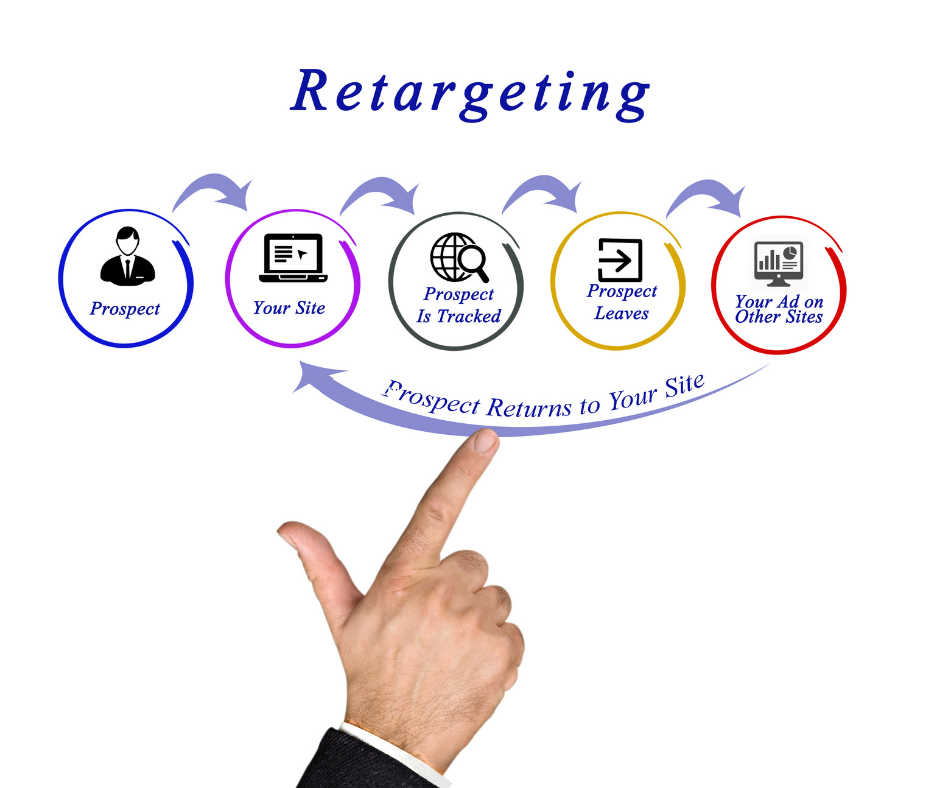
    Retargeting Ads

    Common Mistakes to Avoid

    • Retargeting all users with same ads
    • Not excluding converters
    • Ignoring mobile users
    • Using generic creatives
    • Not analyzing performance data

    Tools to Enhance Your Retargeting Ads

    • Google Tag Manager – Tag deployment
    • Google Analytics 4 – Audience insights
    • Looker Studio (Data Studio) – Performance dashboards
    • Canva / Adobe Express – Ad creatives
    • CWK Agency Audit Tool – Custom audit of retargeting campaigns

    Conclusion: Get Back Your Lost Customers with Smart Retargeting

    Retargeting is no longer optional. If you want to get back your lost customers, you need a smart and structured retargeting strategy.

    Using Google Ads and other SEM platforms, you can remind, re-engage, and recover your website visitors. By applying the steps and strategies in this module, you’ll turn bounce rates into business growth.

    This is just one part of our ongoing digital marketing journey with Kamlesh Singad at CWK Agency. Stay tuned for more insights in the next module!

    FAQs

    What are Retargeting Ads in Google Ads?

    Answer: Retargeting Ads are a type of digital advertisement that targets users who have previously visited your website but didn’t convert. Google Ads uses cookies to track these users and display relevant ads across its Display Network, Search Network, YouTube, and more.

    How do Retargeting Ads help to get back lost customers?

    Answer: Retargeting Ads serve personalized content to users who left your website without taking action. By re-engaging them with tailored messages, offers, or product reminders, you significantly increase the chances of converting them into paying customers.

    What’s the difference between retargeting and standard display ads?

    Answer: Standard display ads target a broad audience, while retargeting ads focus only on users who have previously interacted with your brand. Retargeting is more personalized and cost-effective, as it targets warmer leads.

    Is retargeting part of Search Engine Marketing (SEM)?

    Answer: Yes, retargeting is a key component of SEM. It complements your search ads by helping recover users who clicked your ads but didn’t convert. Platforms like Google Ads provide full retargeting capabilities within SEM campaigns.

    What platforms support retargeting with Google Ads?

    Answer: Retargeting in Google Ads works on:

    • Google Display Network (websites, blogs, etc.)
    • Google Search Network
    • YouTube
    • Gmail
    • Google Shopping
    • Mobile Apps (via AdMob)

    How can I set up a Retargeting Ad campaign on Google Ads?

    Answer: To set up a retargeting campaign:

    1. Install the Google Ads tag on your website.
    2. Create custom audience lists based on user behavior.
    3. Build a new Display, Search, or YouTube campaign.
    4. Add your retargeting audience.
    5. Launch and optimize your campaign regularly.

    What’s dynamic retargeting and how is it different?

    Answer: Dynamic retargeting shows users personalized ads with the exact products they viewed on your website. It uses your product feed to automatically generate relevant ad creatives, making it highly effective for eCommerce businesses.

    How long should I run retargeting ads for each user?

    Answer: The ideal duration is 7–30 days, depending on your sales cycle. Use shorter durations for time-sensitive offers and longer for high-ticket products. Frequency capping is essential to avoid ad fatigue.

    What budget is recommended for retargeting campaigns?

    Answer: Start with a small daily budget (e.g., ₹500–₹1,000/day) and scale up based on performance. Retargeting is generally more cost-effective than cold audience targeting, offering a higher ROI.

    Can I run retargeting ads without a website?

    Answer: You need some form of digital presence (like a website or landing page) to track users and build audience lists. However, you can also use YouTube channel views, app installs, or email lists for retargeting in Google Ads.

    Why should businesses include retargeting in their digital marketing strategy?

    Answer: Retargeting helps businesses maximize the value of their existing traffic. Instead of losing potential customers, retargeting keeps your brand top-of-mind, nurtures leads, and drives them toward conversion with targeted reminders.

    How does CWK Agency implement retargeting strategies?

    Answer: At CWK Agency, under the guidance of Kamlesh Singad, we create customized audience segments, use dynamic creatives, and implement multi-channel retargeting (including YouTube and Display) to maximize client conversions and ROI.
  • Display Ads vs Search Ads: What’s the Difference? | Part-23

    Display Ads vs Search Ads: What’s the Difference? | Part-23

    Module 4 – Google Ads / SEM

    As part of Module 4 in our Digital Marketing Course, we explore one of the most common beginner questions in paid marketing: Display Ads vs Search Ads – What’s the Difference?

    Both are part of the Google Ads platform, both fall under Search Engine Marketing (SEM), and both drive results. But they work differently, serve different purposes, and are useful in different situations.

    In this blog by Kamlesh Singad and the CWK Agency team, we will decode both ad types in a practical, student-friendly way. By the end, you’ll know:

    • How each ad type works
    • When to use Search or Display
    • Which campaign is right for your brand or client
    • How to implement both in your marketing strategy

    What Are Google Search Ads?

    Search Ads are text-based ads that appear on Google Search Engine Results Pages (SERPs) when users search specific keywords.

    Key Characteristics:

    • Text-only format (headline + description + extensions)
    • Triggered by intent-based search queries
    • Appear above or below organic results
    • Highly relevant to what users are looking for

    Example:

    User types: “Buy Smart Digital Board”
    Top result: A Search Ad showing “Smart Boards – 3-Year Warranty – Order Now”

    Best For:

    • Capturing high-intent traffic
    • Local services
    • B2B & B2C lead generation
    • E-commerce during purchase phase

    Also Read: Best Podcast editing company in Indore – CWK Agency

    Display Ads vs Search Ads

    What Are Google Display Ads?

    Display Ads are visual ads (images, banners, GIFs, or videos) that appear across Google’s Display Network—which includes over 2 million websites, YouTube, Gmail, and mobile apps.

    Key Characteristics:

    • Visually engaging (image/video-rich)
    • Appear outside of search (e.g., news websites, blogs)
    • Triggered by demographics, interest, behavior, placements
    • Excellent for awareness and retargeting

    Example:

    You’re reading a blog on classroom technology, and a banner ad shows:
    “Get Your Digital Board Today – Flat ₹5,000 Off”

    Best For:

    • Brand awareness
    • Product launches
    • Retargeting site visitors
    • Mass reach campaigns

    Display Ads vs Search Ads: Core Differences

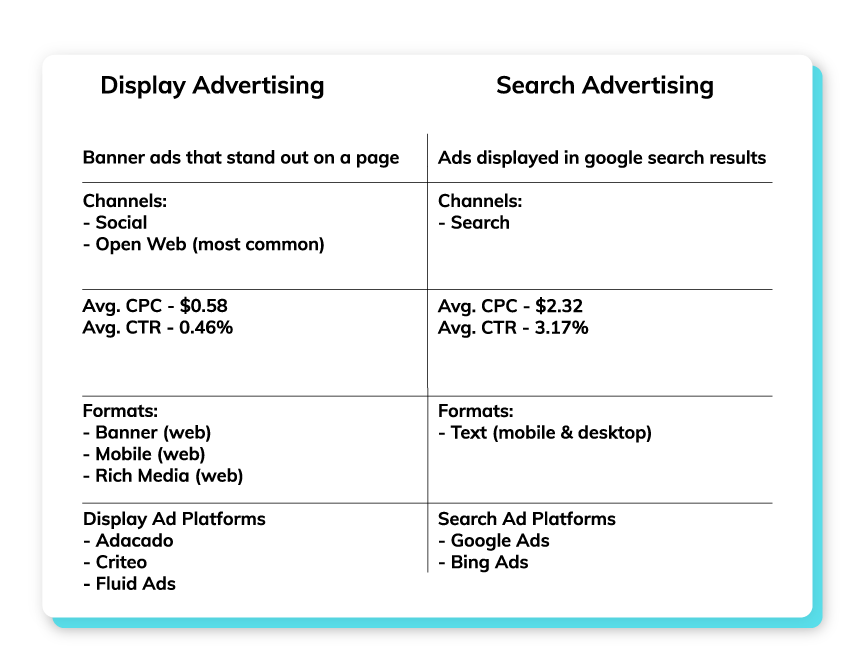
    FeatureSearch AdsDisplay Ads
    PlacementGoogle Search ResultsGoogle Display Network
    Ad TypeTextImages, Banners, Videos
    User IntentHighLow to Moderate
    TargetingKeyword-basedAudience-based
    Best ForConversions, LeadsAwareness, Remarketing
    CTR (Click-Through Rate)HighLower
    CPC (Cost Per Click)HigherGenerally Lower
    Conversion StageBottom of FunnelTop/Mid Funnel

    Kamlesh Singad Tip: Use Search Ads to convert, and Display Ads to create demand.

    Also Read: How ChatGPT Works: A 6-Minute Guide to Understanding ChatGPT for Beginners

    Display Ads vs Search Ads

    Real-Life Scenario: CWK Agency Strategy

    Let’s say you’re promoting studio setups for online teachers.

    First Use Display Ads:

    • Target YouTubers, educators, and creators
    • Show banners with “Build Your Dream Studio – Affordable Packages”
    • Drive traffic to landing page

    Then Use Search Ads:

    • When users now Google “Online teaching studio setup,” your Search Ad shows up
    • Capture high-intent clicks
    • Close the sale

    This funnel strategy combines awareness + intent and is the exact framework used by CWK Agency for hundreds of clients.

    When to Use Display Ads

    ✔ You’re launching a new product or service
    ✔ You want to reach a broad audience
    ✔ You’re targeting specific demographics or interests
    ✔ You want visual storytelling (graphics, offers, branding)
    ✔ You’re doing retargeting campaigns

    Tips for Effective Display Ads:

    • Use high-resolution images
    • Keep text minimal and bold
    • Add strong CTA: “Shop Now”, “Get Demo”, “Download”
    • Target by interests, in-market segments, and custom intent

    Also Read: DevOps and Cloud Computing Explained in 10 Minutes: A Quick Introduction to Modern IT Practices

    Display Ads vs Search Ads

    When to Use Search Ads

    ✔ You’re targeting users with active purchase intent
    ✔ You want fast lead generation
    ✔ You have limited budget and need high ROI
    ✔ Your product/service is urgent or time-sensitive
    ✔ You offer local services (e.g., “Best Digital Board Dealer in Pune”)

    Tips for Effective Search Ads:

    • Use exact match or phrase match keywords
    • Optimize ad headlines with numbers and benefits
    • Link to highly relevant landing pages
    • Track conversions with Google Analytics

    Which One Is Better?

    It’s not about Search vs Display — it’s about how you combine both.

    GoalBest Option
    Increase Website TrafficDisplay
    Generate High-Quality LeadsSearch
    Build Brand AwarenessDisplay
    Immediate SalesSearch
    Retarget Interested VisitorsDisplay
    Promote YouTube VideoDisplay (YouTube)
    Promote Local ServiceSearch

    Combine both for full-funnel success. CWK Agency always runs at least one Search and one Display campaign per client.

    How to Set Up Both in Google Ads

    For Search Ads:

    • Go to Google Ads > New Campaign
    • Choose “Leads” or “Website Traffic”
    • Select Search
    • Add keywords, write ad copy, set budget, and launch

    For Display Ads:

    • Choose “Brand Awareness” or “Product Consideration”
    • Select Display
    • Upload visuals, set targeting (age, interest, device), set budget

    Practical Exercise for Students

    Assignment: Run a dual campaign strategy

    1. Set up a Display Ad campaign with banners for an imaginary product
    2. Set up a Search Ad campaign targeting keywords related to that product
    3. Track both for 5–7 days
    4. Submit a report showing:
      • Impressions
      • CTR
      • Cost per click
      • Conversions (if any)

    CWK Agency mentors will provide personalized feedback and optimization tips.

    FAQs

    Q1: Are Display Ads cheaper than Search Ads?

    Yes. Generally, CPC for Display Ads is lower, but conversion rate may also be lower.

    Q2: Can I use both types at once?

    Absolutely! In fact, using both boosts overall effectiveness.

    Q3: Do I need a different landing page for each?

    You can use the same, but for better performance, tailor landing pages to the ad type.

    Q4: Are Display Ads only for big brands?

    No. Even small businesses can use Display Ads effectively for retargeting and awareness.

    Final Words from Kamlesh Singad

    “A skilled marketer doesn’t choose between Search and Display—they master both. At CWK Agency, we believe in giving students the full stack to win in Google Ads.”

    Now that you understand the difference between Display Ads and Search Ads, your next step is to experiment. Run, test, learn, optimize. That’s how marketers are made.

  • How to Run Your First Google Search Campaign | Part-22

    How to Run Your First Google Search Campaign | Part-22

    Module 4: Google Ads / SEM

    Welcome to Module 4 of our Digital Marketing Course, where we dive deep into the Google Ads ecosystem, focusing specifically on Search Engine Marketing (SEM).

    In this module, you’ll learn How to Run Your First Google Search Campaign—from start to launch to optimization. This guide, curated by Kamlesh Singad and the expert team at CWK Agency, is tailored for beginners, students, and aspiring digital marketers looking to practically master paid ads.

    Why Google Search Campaign?

    A Google Search Campaign puts your business on top of search results when someone actively searches for your product or service.

    For example:
    Search: “Best Podcast Setup in India”
    Result: Your ad on top, even above organic results.

    Benefits:

    • Target users with high intent
    • Fast results compared to SEO
    • Full control over ad copy, location, budget, and targeting
    • Works for any budget

    Also Read: What Is Agile Methodology? A 6-Minute Beginner’s Guide

    How to Run Your First Google Search Campaign

    Understanding Google Ads Structure

    Before diving in, let’s understand how Google Ads is structured:

    1. Account: Linked with your Gmail.
    2. Campaign: Set objective, budget, location, and networks.
    3. Ad Group: Organize keywords and ads.
    4. Ads: Actual content users see.

    This hierarchical structure helps in creating clean, measurable, and scalable ad setups.

    Tools You’ll Need Before You Start

    ToolUse
    Gmail IDTo create a Google Ads account
    Website URLWhere you want traffic
    Google Keyword PlannerFor keyword research
    Google AnalyticsFor tracking conversions
    Google Tag ManagerFor event-based tracking

    CWK Tip: Install Google Tag Assistant to debug any issues.

    Step-by-Step Guide: How to Run Your First Google Search Campaign

    Step 1: Create Your Google Ads Account

    Visit: https://ads.google.com
    Use your Gmail to sign up and switch to Expert Mode to unlock full campaign features.

    Step 2: Select Campaign Goal

    Choose your objective:

    • Website Traffic (Best for first campaign)
    • Leads
    • Sales

    Choose Search Campaign as your campaign type.

    Also Read: Introduction to Software Development Life Cycle (SDLC): What Is Software Development?

    How to Run Your First Google Search Campaign

    Step 3: Campaign Settings

    • Campaign Name: e.g., “Digital Board Sales – India”
    • Networks: Uncheck Display Network (only Search)
    • Location: Select country/state/city or pin codes
    • Languages: Usually English and Hindi for India
    • Budget: Start with ₹300–₹500/day
    • Bidding: Choose Clicks and manually set CPC (₹5–₹20 depending on niche)

    Step 4: Add Keywords

    Use Keyword Planner to find high-intent keywords.

    Match TypeKeywordMatch Behavior
    Broad Matchdigital boardsShows on related searches
    Phrase Match“buy digital board”Shows when phrase matches
    Exact Match[digital board in Pune]Shows only on exact search

    Don’t forget to add negative keywords like “free”, “cheap”, etc.

    Step 5: Create Ad Groups

    Each ad group targets one product/service.

    Example:

    • Ad Group 1: Digital Boards
    • Ad Group 2: Podcast Equipment
    • Ad Group 3: Studio Setup

    Step 6: Write High-Converting Ad Copy

    Headline Examples:

    • Buy Digital Boards Online
    • Smart Boards for Teachers
    • EMI Available – Order Now

    Description Examples:

    • Top-quality interactive digital boards. Free shipping & 3-year warranty. Shop now!
    • Best for teachers, trainers & YouTubers. Get it delivered across India.

    Also Read: Metaverse Explained in 5 Minutes: What It Is and How It Works

    How to Run Your First Google Search Campaign

    Use:

    • Primary Keywords
    • Power Words like “Free,” “Top-Rated,” “Instant”
    • CTA like “Call Now,” “Buy Today,” “Explore”

    Step 7: Add Extensions

    Extensions increase CTR by up to 20%.

    ExtensionUse
    SitelinkLink to other pages like Pricing, Demo
    CalloutAdd offers like “Free Delivery”
    Structured SnippetsShowcase features
    Call ExtensionAdd your phone number

    Step 8: Review & Publish

    • Double-check: Keywords, Budget, Ads
    • Click Publish
    • Google will review the ad (usually within 24 hours)

    Tracking Your Campaign Performance

    Once your campaign is live, monitor it using:

    MetricPurpose
    CTR (Click Through Rate)Clicks ÷ Impressions
    CPC (Cost Per Click)What you pay for each click
    Quality ScoreRelevance of keyword + ad + landing page
    Conversion RateClicks that turned into actions
    Impression ShareMarket competitiveness

    CWK Agency uses Google Ads + Google Analytics combo for best insights.

    How to Optimize Your Campaign Over Time

    1. Pause low-performing keywords
    2. Increase bids on converting keywords
    3. Test new ad copies weekly
    4. A/B test landing pages
    5. Add more negative keywords
    6. Use Ad Schedule (run ads only when leads convert best)

    Optimization is an ongoing process. Kamlesh Singad says:
    “The first campaign is just the beginning. Analyze, optimize, repeat.”

    Also Read: What is Azure? A 5-Minute Beginner’s Guide to Microsoft Azure

    How to Run Your First Google Search Campaign

    Practical Assignment for Students

    Goal: Create a Search Campaign for a mock product (e.g., “Online Course for Python”)

    Submit:

    • Screenshot of Campaign Settings
    • Keyword List
    • Sample Ad Copy
    • Budget Distribution
    • Performance after 3 days (CTR, CPC)

    CWK Agency mentors will review and guide every student for practical mastery.

    Real-World Case Study

    Client: Smart Class Setup Provider in Delhi
    Budget: ₹15,000/month
    Goal: Leads for Digital Boards

    Result:

    • CPC: ₹8.5
    • CTR: 6.4%
    • Leads: 52 in 28 days
      Strategy Used: Exact match keywords, high-quality ad copy, call extensions

    Achieved 3X ROI in the first month of running a Google Search Campaign with CWK Agency.

    FAQs

    Q1. Can I run ads without a website?

    No, for Search Campaigns, you need a website or landing page.

    Q2. How much money do I need?

    You can start with as little as ₹300/day (~$4 USD/day).

    Q3. Is this better than Facebook Ads?

    Search ads target high-intent users, while Facebook targets interest-based users. Both are useful.

    Q4. How long before I see results?

    Sometimes within a day. But meaningful data comes in after 3–7 days.

    Conclusion

    Starting with Google Ads might seem overwhelming, but with this structured guide from Kamlesh Singad and CWK Agency, you now know exactly How to Run Your First Google Search Campaign.

    Action Plan for Students:

    • Create a Google Ads account
    • Pick a product/service
    • Set up your first Search Campaign
    • Track performance for 7 days
    • Optimize based on CTR and conversions

    Don’t just learn—implement. That’s the CWK philosophy.

  • 7 Powerful Google Ads Hacks to Scale Your Campaigns Profitably

    7 Powerful Google Ads Hacks to Scale Your Campaigns Profitably

    In the competitive landscape of digital advertising, effectively scaling your Google Ads campaigns is crucial for maximizing profitability. Implementing strategic optimizations can lead to significant improvements in performance and return on investment (ROI). Here are seven powerful Google Ads hacks to help you scale your campaigns profitably:

    1. Develop In-Depth Remarketing Audiences

    Remarketing targets users who have previously interacted with your website, offering a higher likelihood of conversion. By creating detailed remarketing audiences, you can tailor your ads to users based on their specific behaviors and interests. This approach not only enhances click-through rates (CTR) but also reduces cost-per-click (CPC), providing a better return on your advertising spend.

    2. Focus on Long-Tail Keywords

    Long-tail keywords are more specific phrases that typically have lower search volumes but higher intent. Targeting these keywords can lead to higher conversion rates and lower CPCs, as they are less competitive. By focusing on long-tail keywords, you attract users who are further along in the purchasing process, thereby increasing the likelihood of conversion.

    Also Read: How to Make Your Podcast More Popular: 12 Proven Strategies for Growth

    Google Ads Hacks

    3. Utilize Exclusions for Precise Targeting

    Implementing exclusions allows you to refine your audience by excluding demographics or interests that are less likely to convert. This precision targeting ensures that your ads are shown to users who are more likely to be interested in your products or services, thereby improving conversion rates and optimizing your ad spend.

    4. Test Different Geographic Locations

    Geographic performance can vary significantly, making it essential to test different locations to identify areas with higher conversion rates. By creating location-based campaigns or ad groups, you can allocate your budget more effectively and tailor your messaging to resonate with specific regional audiences.

    5. Leverage Ad Extensions

    Ad extensions enhance your ads by providing additional information and increasing visibility. Utilizing extensions such as sitelinks, callouts, and structured snippets can improve your ad’s CTR and overall performance. These extensions make your ads more informative and engaging, encouraging users to click through to your website.

    Also Read: How Often Should Content Be Updated?

    Google Ads Hacks

    6. Implement UTM Tracking

    UTM tracking involves adding unique parameters to your URLs to monitor the performance of your campaigns in detail. This tracking enables you to identify which ads, keywords, or campaigns are driving the most traffic and conversions, allowing for data-driven optimization decisions.

    7. Target Competitor Keywords

    Bidding on competitor keywords can capture the attention of users searching for similar products or services. This strategy can increase your market share and attract customers who are considering alternatives. Ensure that your ad copy clearly communicates your unique value proposition to persuade users to choose your offering over competitors.

    By incorporating these Google Ads hacks into your advertising strategy, you can effectively scale your campaigns and achieve more profitable results. Continuous testing and optimization are key to maintaining and improving performance in the dynamic landscape of digital advertising.

    Also Read: How to Spend on Marketing the Right Way? A Strategic Guide for Maximum ROI

    Google Ads Hacks

    FAQs

    What are long-tail keywords, and why are they important?

    Long-tail keywords are specific, longer phrases that users search for, often indicating higher intent. They are important because they typically have lower competition and higher conversion rates, making them cost-effective targets in advertising campaigns.

    How do ad extensions improve my Google Ads performance?

    Ad extensions provide additional information and increase the visibility of your ads, leading to higher click-through rates. They make your ads more informative and engaging, which can improve overall performance and ROI.

    Why should I implement UTM tracking in my campaigns?

    UTM tracking allows you to monitor the effectiveness of your campaigns by providing detailed data on traffic sources and user behavior. This information is crucial for making informed optimization decisions and improving campaign performance.

    Is targeting competitor keywords a good strategy?

    Targeting competitor keywords can be effective in capturing the attention of users considering alternative products or services. It can increase your market share and attract potential customers, but it’s important to ensure your ads clearly communicate your unique value proposition.

    How can exclusions help in optimizing my ad campaigns?

    Implementing exclusions helps refine your audience by removing demographics or interests less likely to convert. This precision targeting ensures your ads reach users more likely to be interested in your offerings, improving conversion rates and optimizing ad spend.

    What is the benefit of testing different geographic locations in my campaigns?

    Testing different geographic locations allows you to identify regions with higher conversion rates. By focusing your budget on these areas, you can improve overall campaign performance and achieve a better return on investment.

    Conclusion

    Scaling your Google Ads campaigns profitably requires strategic planning and continuous optimization. By implementing these seven powerful hacks—developing in-depth remarketing audiences, focusing on long-tail keywords, utilizing exclusions, testing different geographic locations, leveraging ad extensions, implementing UTM tracking, and targeting competitor keywords—you can enhance your campaign performance and achieve sustainable growth.