Tag: google ads course

  • Display Ads vs Search Ads: What’s the Difference? | Part-23

    Display Ads vs Search Ads: What’s the Difference? | Part-23

    Module 4 – Google Ads / SEM

    As part of Module 4 in our Digital Marketing Course, we explore one of the most common beginner questions in paid marketing: Display Ads vs Search Ads – What’s the Difference?

    Both are part of the Google Ads platform, both fall under Search Engine Marketing (SEM), and both drive results. But they work differently, serve different purposes, and are useful in different situations.

    In this blog by Kamlesh Singad and the CWK Agency team, we will decode both ad types in a practical, student-friendly way. By the end, you’ll know:

    • How each ad type works
    • When to use Search or Display
    • Which campaign is right for your brand or client
    • How to implement both in your marketing strategy

    What Are Google Search Ads?

    Search Ads are text-based ads that appear on Google Search Engine Results Pages (SERPs) when users search specific keywords.

    Key Characteristics:

    • Text-only format (headline + description + extensions)
    • Triggered by intent-based search queries
    • Appear above or below organic results
    • Highly relevant to what users are looking for

    Example:

    User types: “Buy Smart Digital Board”
    Top result: A Search Ad showing “Smart Boards – 3-Year Warranty – Order Now”

    Best For:

    • Capturing high-intent traffic
    • Local services
    • B2B & B2C lead generation
    • E-commerce during purchase phase

    Also Read: Best Podcast editing company in Indore – CWK Agency
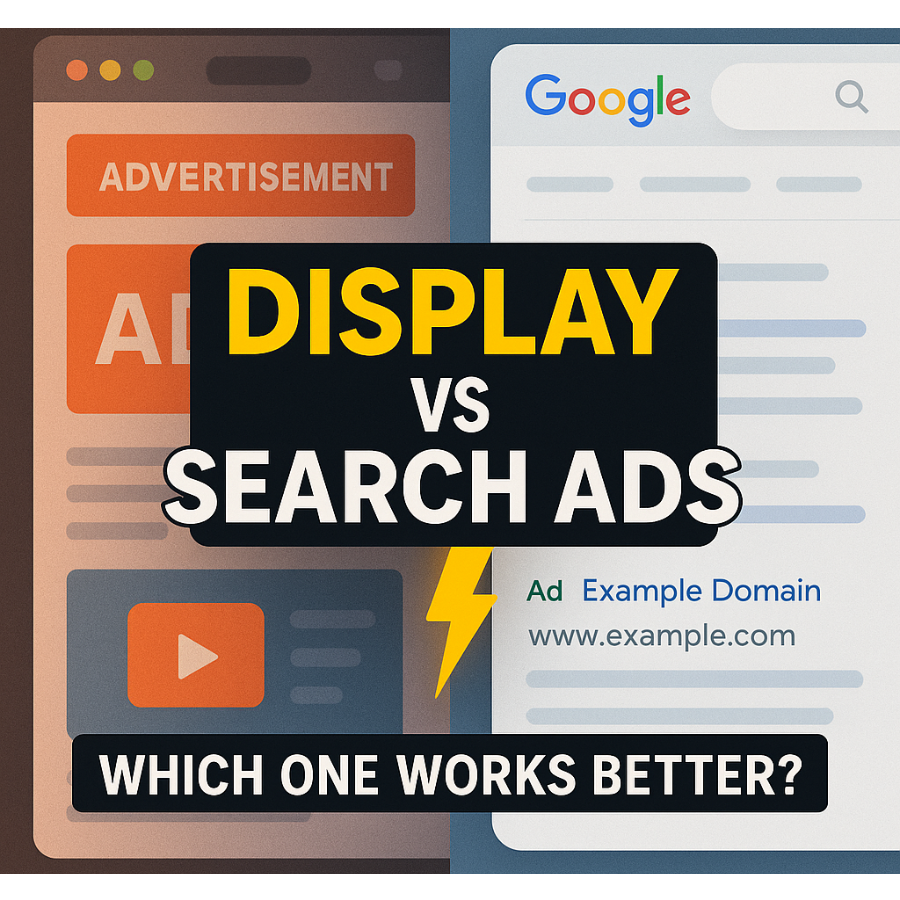
    Display Ads vs Search Ads

    What Are Google Display Ads?

    Display Ads are visual ads (images, banners, GIFs, or videos) that appear across Google’s Display Network—which includes over 2 million websites, YouTube, Gmail, and mobile apps.

    Key Characteristics:

    • Visually engaging (image/video-rich)
    • Appear outside of search (e.g., news websites, blogs)
    • Triggered by demographics, interest, behavior, placements
    • Excellent for awareness and retargeting

    Example:

    You’re reading a blog on classroom technology, and a banner ad shows:
    “Get Your Digital Board Today – Flat ₹5,000 Off”

    Best For:

    • Brand awareness
    • Product launches
    • Retargeting site visitors
    • Mass reach campaigns

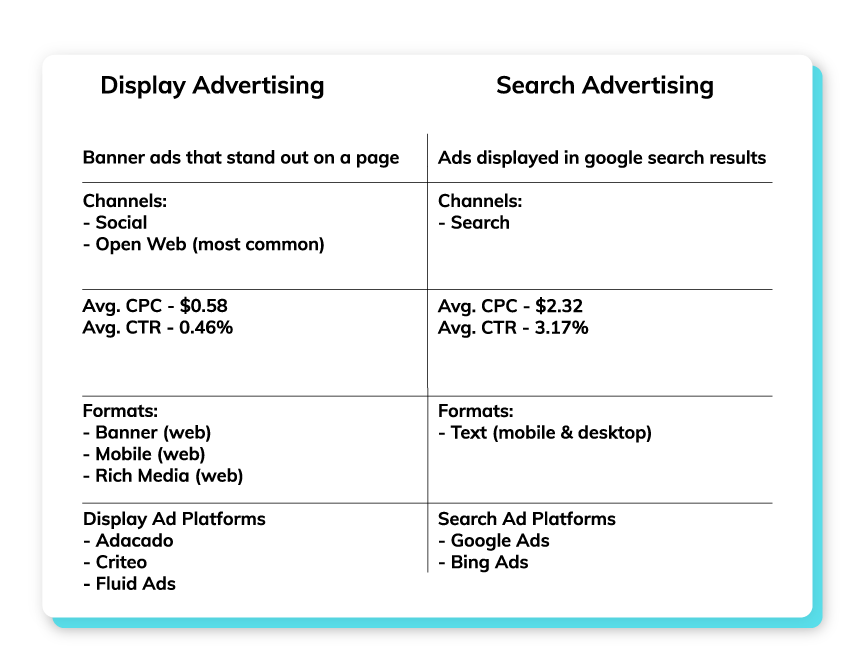
    Display Ads vs Search Ads: Core Differences

    FeatureSearch AdsDisplay Ads
    PlacementGoogle Search ResultsGoogle Display Network
    Ad TypeTextImages, Banners, Videos
    User IntentHighLow to Moderate
    TargetingKeyword-basedAudience-based
    Best ForConversions, LeadsAwareness, Remarketing
    CTR (Click-Through Rate)HighLower
    CPC (Cost Per Click)HigherGenerally Lower
    Conversion StageBottom of FunnelTop/Mid Funnel

    Kamlesh Singad Tip: Use Search Ads to convert, and Display Ads to create demand.

    Also Read: How ChatGPT Works: A 6-Minute Guide to Understanding ChatGPT for Beginners

    Display Ads vs Search Ads

    Real-Life Scenario: CWK Agency Strategy

    Let’s say you’re promoting studio setups for online teachers.

    First Use Display Ads:

    • Target YouTubers, educators, and creators
    • Show banners with “Build Your Dream Studio – Affordable Packages”
    • Drive traffic to landing page

    Then Use Search Ads:

    • When users now Google “Online teaching studio setup,” your Search Ad shows up
    • Capture high-intent clicks
    • Close the sale

    This funnel strategy combines awareness + intent and is the exact framework used by CWK Agency for hundreds of clients.

    When to Use Display Ads

    ✔ You’re launching a new product or service
    ✔ You want to reach a broad audience
    ✔ You’re targeting specific demographics or interests
    ✔ You want visual storytelling (graphics, offers, branding)
    ✔ You’re doing retargeting campaigns

    Tips for Effective Display Ads:

    • Use high-resolution images
    • Keep text minimal and bold
    • Add strong CTA: “Shop Now”, “Get Demo”, “Download”
    • Target by interests, in-market segments, and custom intent

    Also Read: DevOps and Cloud Computing Explained in 10 Minutes: A Quick Introduction to Modern IT Practices

    Display Ads vs Search Ads

    When to Use Search Ads

    ✔ You’re targeting users with active purchase intent
    ✔ You want fast lead generation
    ✔ You have limited budget and need high ROI
    ✔ Your product/service is urgent or time-sensitive
    ✔ You offer local services (e.g., “Best Digital Board Dealer in Pune”)

    Tips for Effective Search Ads:

    • Use exact match or phrase match keywords
    • Optimize ad headlines with numbers and benefits
    • Link to highly relevant landing pages
    • Track conversions with Google Analytics

    Which One Is Better?

    It’s not about Search vs Display — it’s about how you combine both.

    GoalBest Option
    Increase Website TrafficDisplay
    Generate High-Quality LeadsSearch
    Build Brand AwarenessDisplay
    Immediate SalesSearch
    Retarget Interested VisitorsDisplay
    Promote YouTube VideoDisplay (YouTube)
    Promote Local ServiceSearch

    Combine both for full-funnel success. CWK Agency always runs at least one Search and one Display campaign per client.

    How to Set Up Both in Google Ads

    For Search Ads:

    • Go to Google Ads > New Campaign
    • Choose “Leads” or “Website Traffic”
    • Select Search
    • Add keywords, write ad copy, set budget, and launch

    For Display Ads:

    • Choose “Brand Awareness” or “Product Consideration”
    • Select Display
    • Upload visuals, set targeting (age, interest, device), set budget

    Practical Exercise for Students

    Assignment: Run a dual campaign strategy

    1. Set up a Display Ad campaign with banners for an imaginary product
    2. Set up a Search Ad campaign targeting keywords related to that product
    3. Track both for 5–7 days
    4. Submit a report showing:
      • Impressions
      • CTR
      • Cost per click
      • Conversions (if any)

    CWK Agency mentors will provide personalized feedback and optimization tips.

    FAQs

    Q1: Are Display Ads cheaper than Search Ads?

    Yes. Generally, CPC for Display Ads is lower, but conversion rate may also be lower.

    Q2: Can I use both types at once?

    Absolutely! In fact, using both boosts overall effectiveness.

    Q3: Do I need a different landing page for each?

    You can use the same, but for better performance, tailor landing pages to the ad type.

    Q4: Are Display Ads only for big brands?

    No. Even small businesses can use Display Ads effectively for retargeting and awareness.

    Final Words from Kamlesh Singad

    “A skilled marketer doesn’t choose between Search and Display—they master both. At CWK Agency, we believe in giving students the full stack to win in Google Ads.”

    Now that you understand the difference between Display Ads and Search Ads, your next step is to experiment. Run, test, learn, optimize. That’s how marketers are made.

  • What is Google Ads and How Does It Work? | Part-21

    What is Google Ads and How Does It Work? | Part-21

    Module 4: Google Ads / SEM

    In today’s digital era, visibility is power. Whether you’re a freelancer, a brand, a startup, or a student learning digital marketing, mastering Google Ads is a must. Google Ads is the leading platform for Search Engine Marketing (SEM), a paid method of placing your business directly in front of users actively searching for your services or products.

    In this module of the digital marketing course led by Kamlesh Singad of CWK Agency, we will break down Google Ads and its working model step-by-step, and more importantly—how YOU can start implementing it from day one.

    What Is Google Ads?

    Google Ads (formerly Google AdWords) is Google’s online advertising platform that allows you to create ads that appear on Google Search, YouTube, and millions of partner websites in the Google Display Network.

    You pay Google when someone clicks on your ad—hence, the term PPC (Pay Per Click).

    Benefits of Google Ads:

    • Instant visibility on the top of Google
    • Highly targeted ad placements
    • Real-time performance tracking
    • Scalable and measurable
    • Works for all budgets

    Kamlesh Tip: If SEO is a marathon, then Google Ads is a sprint. Combine both for optimal performance.

    Also Read: What Is A Proxy & Proxy Server? | Understand Proxies In 5 Minutes!

    Google Ads

    How Does Google Ads Work?

    Let’s break it into simple steps:

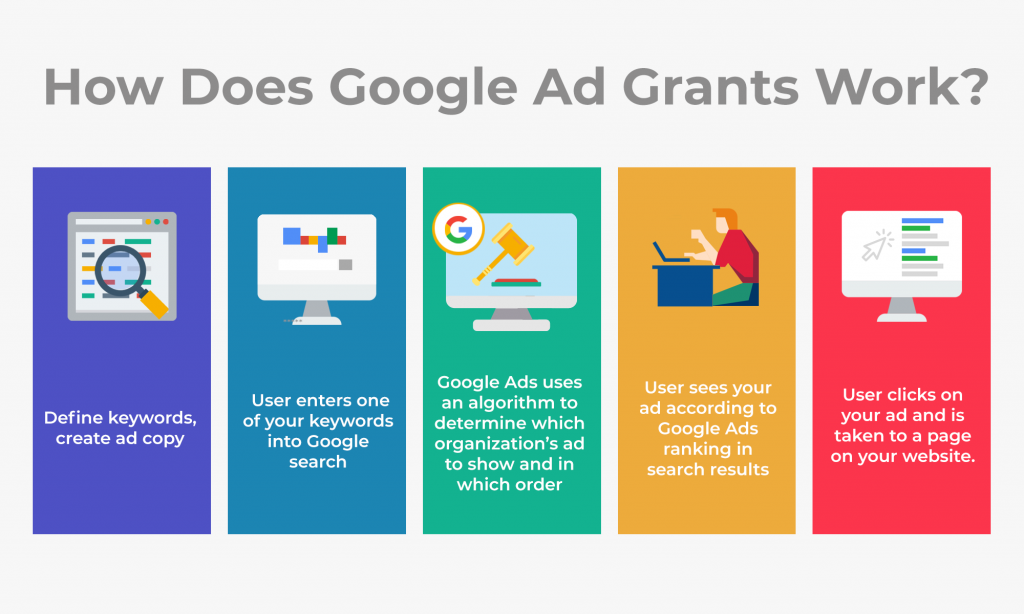
    1. Keyword Targeting

    You choose keywords related to your business (e.g., “Buy Digital Boards in India”). When users type these keywords into Google, your ad can show up.

    2. Ad Auction

    Every time a search is performed, Google runs an auction. Your ad’s visibility depends on:

    • Bid amount
    • Ad relevance
    • Landing page experience
    • Expected CTR (Click Through Rate)

    3. Ad Rank

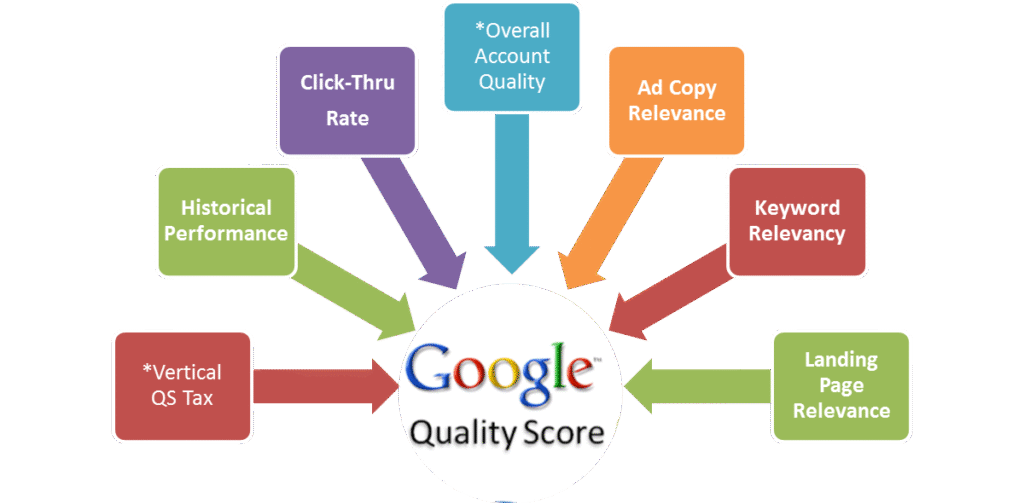
    Google calculates your Ad Rank = CPC Bid × Quality Score

    4. Ad Display

    Based on your Ad Rank, Google determines:

    • Whether your ad will show
    • Which position it will occupy

    5. Cost

    You pay only when someone clicks your ad (Cost Per Click), not when they just view it.

    Also Read: Web 3.0 Explained In 5 Minutes: A Beginner’s Guide to Web3

    Google Ads

    Types of Google Ads Campaigns

    TypeDescriptionBest Use
    Search AdsText ads shown on Google search resultsLead generation, services
    Display AdsImage/video ads across websitesBrand awareness
    Video AdsAds on YouTubeEngagement, product demos
    Shopping AdsProduct ads with image & priceE-commerce
    App CampaignsPromote your app across Google propertiesApp installs
    Performance MaxAll-in-one AI-optimized campaignsBroad goals, automation lovers

    CWK Agency Recommends: Start with Search Campaigns to understand targeting, bidding, and ad copywriting.

    Google Ads Structure

    Google Ads has a 3-layer structure:

    1. Account – Based on email/login
    2. Campaign – Budget, location, network, bidding
    3. Ad Group – Keywords + Ads
    4. Ads – Actual text/image/video shown

    Step-by-Step Guide: How to Run Your First Google Ads Campaign

    Here’s a practical beginner guide by Kamlesh Singad and the CWK Agency team:

    Step 1: Create a Google Ads Account

    Visit ads.google.com and sign up using your Gmail.

    Step 2: Choose Your Campaign Goal

    • Leads
    • Website traffic
    • Sales
    • App promotion

    Step 3: Select Campaign Type

    Start with Search for easier tracking.

    Google Ads

    Step 4: Set Location and Language

    Choose specific locations (e.g., Pune, India).

    Step 5: Set Budget & Bidding

    Set daily budget and choose bidding strategy (manual CPC or automated bidding).

    Step 6: Add Keywords

    Use Google Keyword Planner to research high-volume, low-competition keywords.

    Step 7: Write Ad Copy

    Keep your ad:

    • Clear
    • Relevant
    • Action-oriented

    Example:
    Headline: Buy Digital Boards | Free Delivery
    Description: Get Smart Boards with 3-Year Warranty. Trusted by 5,000+ Educators.

    Step 8: Set Extensions

    Add call buttons, sitelinks, and location extensions for better CTR.

    Step 9: Publish and Monitor

    Once live, monitor daily:

    • CTR
    • CPC
    • Conversions

    Also Read: Cyber War Explained in 5 Minutes: What Is Cyber War? A Beginner’s Guide to Cyber Security

    Key Metrics You Must Track

    MetricMeaningWhy It Matters
    CTRClicks ÷ ImpressionsIndicates ad relevance
    CPCCost per clickAffects your ROI
    Quality ScoreGoogle’s rating of your adImpacts Ad Rank
    Conversion RateActions taken ÷ ClicksIndicates campaign success
    Impression ShareHow often your ad shows vs. how often it couldCompetitiveness

    CWK Agency’s Pro Tips for Success

    1. Use Exact Match and Phrase Match keywords to control who sees your ads.
    2. Write multiple ad variations and let Google test which performs best.
    3. Use negative keywords to avoid irrelevant clicks.
    4. Optimize landing pages – match headline, speed, mobile-responsiveness.
    5. Track conversions using Google Tag Manager and Analytics.

    Case Study by Kamlesh Singad:
    “One of our clients selling digital teaching tools saw a 250% increase in sales with optimized Google Search Campaigns using CWK Agency’s proven framework.”

    Google Ads

    Google Ads vs. SEO: What’s the Difference?

    FeatureGoogle Ads (SEM)SEO
    CostPay-per-clickFree (organic)
    TimeInstantLong-term
    ControlHighLimited
    ScalabilityEasyGradual

    Combine Google Ads for quick leads and SEO for long-term growth.

    FAQs

    Q1: How much does it cost to advertise on Google Ads?

    A: It depends on your bid, competition, and industry. You can start with ₹100/day.

    Q2: Do I need a website to run Google Ads?

    A: Yes, especially for Search and Display campaigns. YouTube campaigns can work with just a video.

    Q3: How long does it take to see results?

    A: Usually within 1–3 days, depending on your budget and targeting.

    Q4: Can I run Google Ads for a local business?

    A: Absolutely. You can geo-target your ads to specific pin codes or cities.

    Learn with CWK Agency: Practical Google Ads Projects

    At CWK Agency, led by Kamlesh Singad, students are assigned real-world projects like:

    • Running ads for small local businesses
    • Managing ₹1,000/day campaigns
    • Tracking conversions using Google Analytics
    • A/B testing headlines and descriptions

    Certificate of Completion + Portfolio Project
    You will complete a live campaign during the course. Add it to your resume or share it with freelance clients.

    Final Thoughts

    Google Ads is one of the most powerful tools in digital marketing, but it must be used wisely. You now understand how it works—from auction to ad creation to performance tracking.

    Whether you’re an aspiring digital marketer, freelancer, or small business owner, you can start your Google Ads journey today.

    At CWK Agency, we believe in action-driven learning. So don’t just read this blog—go create your first campaign now!

  • 7 Powerful Google Ads Hacks to Scale Your Campaigns Profitably

    7 Powerful Google Ads Hacks to Scale Your Campaigns Profitably

    In the competitive landscape of digital advertising, effectively scaling your Google Ads campaigns is crucial for maximizing profitability. Implementing strategic optimizations can lead to significant improvements in performance and return on investment (ROI). Here are seven powerful Google Ads hacks to help you scale your campaigns profitably:

    1. Develop In-Depth Remarketing Audiences

    Remarketing targets users who have previously interacted with your website, offering a higher likelihood of conversion. By creating detailed remarketing audiences, you can tailor your ads to users based on their specific behaviors and interests. This approach not only enhances click-through rates (CTR) but also reduces cost-per-click (CPC), providing a better return on your advertising spend.

    2. Focus on Long-Tail Keywords

    Long-tail keywords are more specific phrases that typically have lower search volumes but higher intent. Targeting these keywords can lead to higher conversion rates and lower CPCs, as they are less competitive. By focusing on long-tail keywords, you attract users who are further along in the purchasing process, thereby increasing the likelihood of conversion.

    Also Read: How to Make Your Podcast More Popular: 12 Proven Strategies for Growth

    Google Ads Hacks

    3. Utilize Exclusions for Precise Targeting

    Implementing exclusions allows you to refine your audience by excluding demographics or interests that are less likely to convert. This precision targeting ensures that your ads are shown to users who are more likely to be interested in your products or services, thereby improving conversion rates and optimizing your ad spend.

    4. Test Different Geographic Locations

    Geographic performance can vary significantly, making it essential to test different locations to identify areas with higher conversion rates. By creating location-based campaigns or ad groups, you can allocate your budget more effectively and tailor your messaging to resonate with specific regional audiences.

    5. Leverage Ad Extensions

    Ad extensions enhance your ads by providing additional information and increasing visibility. Utilizing extensions such as sitelinks, callouts, and structured snippets can improve your ad’s CTR and overall performance. These extensions make your ads more informative and engaging, encouraging users to click through to your website.

    Also Read: How Often Should Content Be Updated?

    Google Ads Hacks

    6. Implement UTM Tracking

    UTM tracking involves adding unique parameters to your URLs to monitor the performance of your campaigns in detail. This tracking enables you to identify which ads, keywords, or campaigns are driving the most traffic and conversions, allowing for data-driven optimization decisions.

    7. Target Competitor Keywords

    Bidding on competitor keywords can capture the attention of users searching for similar products or services. This strategy can increase your market share and attract customers who are considering alternatives. Ensure that your ad copy clearly communicates your unique value proposition to persuade users to choose your offering over competitors.

    By incorporating these Google Ads hacks into your advertising strategy, you can effectively scale your campaigns and achieve more profitable results. Continuous testing and optimization are key to maintaining and improving performance in the dynamic landscape of digital advertising.

    Also Read: How to Spend on Marketing the Right Way? A Strategic Guide for Maximum ROI

    Google Ads Hacks

    FAQs

    What are long-tail keywords, and why are they important?

    Long-tail keywords are specific, longer phrases that users search for, often indicating higher intent. They are important because they typically have lower competition and higher conversion rates, making them cost-effective targets in advertising campaigns.

    How do ad extensions improve my Google Ads performance?

    Ad extensions provide additional information and increase the visibility of your ads, leading to higher click-through rates. They make your ads more informative and engaging, which can improve overall performance and ROI.

    Why should I implement UTM tracking in my campaigns?

    UTM tracking allows you to monitor the effectiveness of your campaigns by providing detailed data on traffic sources and user behavior. This information is crucial for making informed optimization decisions and improving campaign performance.

    Is targeting competitor keywords a good strategy?

    Targeting competitor keywords can be effective in capturing the attention of users considering alternative products or services. It can increase your market share and attract potential customers, but it’s important to ensure your ads clearly communicate your unique value proposition.

    How can exclusions help in optimizing my ad campaigns?

    Implementing exclusions helps refine your audience by removing demographics or interests less likely to convert. This precision targeting ensures your ads reach users more likely to be interested in your offerings, improving conversion rates and optimizing ad spend.

    What is the benefit of testing different geographic locations in my campaigns?

    Testing different geographic locations allows you to identify regions with higher conversion rates. By focusing your budget on these areas, you can improve overall campaign performance and achieve a better return on investment.

    Conclusion

    Scaling your Google Ads campaigns profitably requires strategic planning and continuous optimization. By implementing these seven powerful hacks—developing in-depth remarketing audiences, focusing on long-tail keywords, utilizing exclusions, testing different geographic locations, leveraging ad extensions, implementing UTM tracking, and targeting competitor keywords—you can enhance your campaign performance and achieve sustainable growth.