Tag: code with kamlesh agency indore

  • Setting Up GA4 (Google Analytics 4) Property: 7 Easy Steps for Beginners (2026 Guide)

    Setting Up GA4 (Google Analytics 4) Property: 7 Easy Steps for Beginners (2026 Guide)

    In today’s digital world, understanding your website data is not optional—it’s essential. Whether you are a business owner, blogger, or digital marketer, tracking your website performance helps you make better decisions and grow faster. This is where Google Analytics comes in.

    With the shift from Universal Analytics to Google Analytics 4 (GA4), many beginners feel confused. The interface looks different, and the setup process seems technical. But don’t worry—this guide will help you understand setting up GA4 property in a very simple and practical way.

    If you are learning Digital Marketing in Indore, or working with experts like kamlesh singad or code with kamlesh agency indore, this guide will give you a strong foundation.

    Let’s get started step by step.

    What is Google Analytics 4 (GA4)?

    Google Analytics 4 (GA4) is the latest version of Google Analytics. It helps you track and analyze how users interact with your website or app.

    Unlike the old version, GA4 is based on an event-based tracking system, which means:

    • Every action (click, scroll, page view) is tracked as an event
    • You get deeper insights into user behavior
    • It works better across devices (mobile and desktop)
    Google Analytics 4 (GA4)

    Why GA4 is Important in 2026

    • Universal Analytics is no longer active
    • GA4 provides advanced tracking features
    • Better privacy and data control
    • Helps improve marketing strategies

    For anyone doing Digital Marketing in Indore, learning GA4 is now a must-have skill.

    Why You Should Set Up GA4 Property

    Before jumping into steps, let’s understand why setting up GA4 property is important.

    Key Benefits:

    • Track website visitors in real-time
    • Understand user behavior
    • Measure conversions and goals
    • Improve marketing campaigns
    • Make data-driven decisions

    Whether you run a small business or work in an agency like code with kamlesh agency indore, GA4 helps you grow smarter.

    Read also : Online Reputation Management for Small Businesses: Complete Guide by Code With Kamlesh

    7 Easy Steps for Setting Up GA4 Property

    Now let’s go step by step. Follow these carefully and your GA4 will be ready.

    Step 1: Go to Google Analytics Website

    • Open your browser
    • Search for Google Analytics
    • Click on the official website
    • Sign in using your Gmail account

    If you already have an account, just log in. If not, create a new one.

    Step 2: Create a New Account

    Once you log in:

    • Click on Admin (bottom left corner)
    • Under the Account column, click Create Account
    • Enter your account name (for example: your business name)

    Settings to Select:

    • Data sharing settings (keep default or customize)
    • Click Next

    Step 3: Create GA4 Property

    Now comes the most important step—setting up GA4 property.

    • Enter Property Name (example: Your Website Name)
    • Select your Time Zone (India)
    • Select Currency (INR)
    • Click Next

    Business Details:

    • Choose your industry (Marketing, Education, etc.)
    • Select business size
    • Choose how you will use GA4

    Click Create

    Step 4: Set Up Data Stream

    After creating the property, you need to connect your website.

    • Select Web (for website tracking)
    • Enter your Website URL
    • Enter Stream Name (example: Main Website)

    Click Create Stream

    Step 5: Get GA4 Tracking Code

    Once your stream is created:

    • You will see a Measurement ID (G-XXXXXXX)
    • Scroll down and click View Tag Instructions

    Now you have two options:

    1. Install manually
    2. Use Google Tag Manager (recommended)

    Step 6: Install GA4 on Your Website

    Option 1: Manual Installation

    • Copy the tracking code
    • Paste it inside the <head> section of your website

    Option 2: Using Google Tag Manager

    • Open Google Tag Manager
    • Create a new tag
    • Choose GA4 Configuration
    • Paste Measurement ID
    • Publish the container

    Most professionals in Digital Marketing in Indore prefer Tag Manager because it’s easy and flexible.

    Step 7: Verify Your Setup

    After installing the code:

    • Go to GA4 dashboard
    • Click on Reports → Realtime
    • Visit your website in another tab

    If everything is correct, you will see active users (maybe just you)

    Congratulations. You have successfully completed setting up GA4 property.

    Google Analytics 4 (GA4)

    Common Mistakes to Avoid

    Many beginners make small mistakes during setup. Avoid these:

    • Not installing tracking code properly
    • Using wrong website URL
    • Forgetting to publish Tag Manager
    • Not checking real-time data
    • Ignoring event tracking

    Even experienced marketers like kamlesh singad recommend double-checking every step.

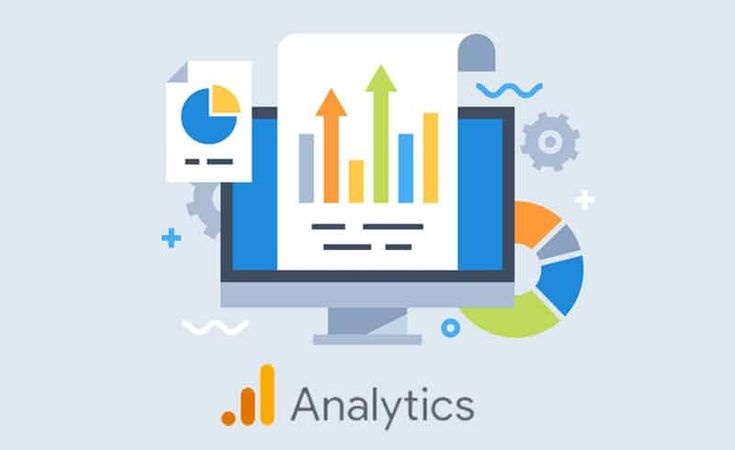
    Understanding GA4 Dashboard (Basic Overview)

    Once your GA4 is ready, you should understand the dashboard.

    Important Sections:

    1. Realtime Report

    Shows live users on your website

    2. Acquisition

    Shows where your traffic is coming from

    3. Engagement

    Shows user activity and time spent

    4. Monetization

    Tracks revenue (if applicable)

    5. Retention

    Shows returning users

    This data is very useful for improving your marketing strategies.
    Google Analytics 4 (GA4)

    Read also : 5 Powerful SEO Techniques to Grow Organic Traffic Fast | Code With Kamlesh

    How GA4 Helps in Digital Marketing

    If you are learning or doing Digital Marketing in Indore, GA4 plays a major role.

    Benefits for Marketers:

    • Track campaign performance
    • Understand customer journey
    • Optimize ads and SEO
    • Improve website experience
    • Increase conversions

    Agencies like code with kamlesh agency indore use GA4 daily to deliver better results for clients.

    Advanced Tips for Beginners

    Once your setup is done, try these:

    1. Set Up Events

    Track actions like:

    • Button clicks
    • Form submissions
    • Scroll depth

    2. Enable Conversions

    Mark important events as conversions

    3. Link Google Ads

    Connect GA4 with Google Ads for better tracking

    4. Use Custom Reports

    Create reports based on your needs

    Why Businesses in Indore Need GA4

    Indore is growing fast in the digital space. Businesses are moving online, and competition is increasing.

    Without data, you are guessing. With GA4, you are making smart decisions.

    That’s why professionals like kamlesh singad focus on tools like Google Analytics to help businesses grow.

    Real-Life Example

    Imagine you run a local business in Indore.

    Without GA4:

    • You don’t know who visits your site
    • You don’t know which page works
    • You don’t know where traffic comes from

    With GA4:

    • You see user behavior
    • You track conversions
    • You improve performance

    This is the power of setting up GA4 property.

    Read also : Advanced Digital Marketing Course in Indore | Learn with Code With Kamlesh Agency

    Who Should Learn GA4?

    This guide is useful for:

    • Beginners in digital marketing
    • Business owners
    • Bloggers
    • Students
    • Freelancers

    If you are part of Digital Marketing in Indore, GA4 is a must-learn skill in 2026.

    Final Thoughts

    Setting up GA4 may look complicated at first, but once you follow the steps, it becomes easy.

    You Learned:

    • What is Google Analytics 4
    • Why it is important
    • 7 easy steps for setup
    • Common mistakes
    • How it helps in marketing

    If you want to grow online, start with setting up GA4 property today.

    And if you need expert guidance, learning from professionals like kamlesh singad or agencies like code with kamlesh agency indore can help you move faster.

    FAQs

    1. What is GA4 property in Google Analytics?

    A GA4 property is a setup in Google Analytics 4 where your website or app data is collected and analyzed. It helps track user activity, traffic sources, and conversions in one place.

    2. How do I start setting up GA4 property?

    To start setting up GA4 property, you need to create a Google Analytics account, add a new property, set up a data stream, and install the tracking code on your website.

    3. Is Google Analytics 4 free to use?

    Yes, Google Analytics 4 is completely free and can be used by beginners, businesses, and marketers to track and analyze website performance.

    4. Do I need coding knowledge for setting up GA4 property?

    No, you do not need coding skills. You can set up GA4 using simple steps or tools like Google Tag Manager without writing code.

    5. How can GA4 help in digital marketing?

    GA4 helps in digital marketing by tracking user behavior, measuring campaign performance, identifying traffic sources, and improving conversions through data-driven insights.

  • Online Reputation Management for Small Businesses: Complete Guide by Code With Kamlesh

    Online Reputation Management for Small Businesses: Complete Guide by Code With Kamlesh

    In today’s digital world, your business reputation is no longer built only through word of mouth. Instead, it is shaped online through Google reviews, social media comments, customer feedback, and ratings. For Small Businesses, maintaining a positive online image is extremely important for growth and success.

    This is where Online Reputation Management (ORM) plays a crucial role. At Code With Kamlesh, led by Kamlesh Singad, we help businesses build, manage, and protect their online reputation effectively.

    In this complete guide, you will learn everything about Online Reputation Management, why it matters, and how small businesses can use it to grow faster.

    Online Reputation Management

    What is Online Reputation Management?

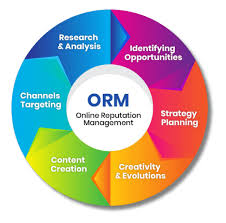
    Online Reputation Management (ORM) is the process of monitoring, managing, and improving how your business appears online. It includes:

    • Managing customer reviews
    • Responding to feedback
    • Handling negative comments
    • Promoting positive content
    • Building trust online

    In simple words, ORM helps you control what people see when they search for your business on Google or social media.

    Online Reputation Management

    Why Online Reputation Management is Important for Small Businesses

    For Small Businesses, reputation is everything. Unlike big brands, small businesses rely heavily on trust and customer relationships.

    1. Builds Customer Trust

    People trust online reviews as much as personal recommendations. A positive reputation increases trust instantly.

    2. Influences Buying Decisions

    Before purchasing, customers check reviews. Good ratings can directly increase your sales.

    3. Improves Online Visibility

    Positive reviews and engagement help improve rankings in Digital Marketing in Indore strategies like SEO.

    4. Creates Brand Image

    Your online presence reflects your brand personality. ORM helps maintain a professional image.

    5. Gives Competitive Advantage

    A strong reputation can help you stand out from competitors in a crowded market.

    Read also : 6 Advanced Social Media Marketing Tips to Grow Your Business Fast | Code With Kamlesh

    Key Elements of Online Reputation Management

    To manage your reputation effectively, you need to focus on these important areas:

    1. Online Reviews Management

    Platforms like Google, Justdial, and social media are full of customer reviews. Managing them is essential.

    2. Social Media Presence

    Your activity on platforms like Facebook, Instagram, and LinkedIn impacts your reputation.

    3. Search Engine Results

    What appears on Google when someone searches your business matters a lot.

    4. Customer Feedback

    Listening to your customers and improving based on their feedback builds trust.

    5. Content Management

    Positive blogs, testimonials, and posts help push down negative content.

    Online Reputation Management

    Read also : 5 Powerful SEO Techniques to Grow Organic Traffic Fast | Code With Kamlesh

    Step-by-Step Guide to Online Reputation Management

    Step 1: Monitor Your Online Presence

    First, you need to know what people are saying about your business.

    • Search your business name on Google
    • Check reviews regularly
    • Track social media mentions

    This helps you understand your current reputation.

    Step 2: Respond to Customer Reviews

    Always reply to reviews—both positive and negative.

    For Positive Reviews:

    • Say thank you
    • Appreciate the customer
    • Encourage repeat visits

    For Negative Reviews:

    • Stay calm and professional
    • Apologize if needed
    • Offer a solution

    Quick and polite responses show that you care about customers.

    Step 3: Encourage Happy Customers to Leave Reviews

    Many satisfied customers don’t leave reviews unless asked.

    You can:

    • Ask customers after a successful service
    • Send follow-up messages
    • Provide direct review links

    More positive reviews improve your online reputation.

    Step 4: Handle Negative Feedback Smartly

    Negative reviews are normal. What matters is how you handle them.

    • Never argue online
    • Solve the issue privately if possible
    • Show professionalism in your response

    This builds trust even in difficult situations.

    Step 5: Improve Your Social Media Image

    Social media is a powerful tool in Digital Marketing in Indore.

    • Post regularly
    • Share customer success stories
    • Engage with followers
    • Reply to comments

    Active social media creates a strong brand impression.

    Step 6: Create Positive Content

    Content helps you control your online image.

    You can create:

    • Blog posts
    • Customer testimonials
    • Case studies
    • Social media posts

    At Code With Kamlesh Agency Indore, we focus on creating positive content that highlights your brand strengths.

    Step 7: Focus on Local SEO

    For small businesses, local visibility is very important.

    • Optimize your Google Business Profile
    • Use local keywords
    • Add location details
    • Collect local reviews

    This helps your business rank higher in local searches.

    Read also : Online Marketing Indore: 7 Powerful Strategies to Grow Your Business Faster

    Common Mistakes Small Businesses Should Avoid

    Many businesses unknowingly damage their reputation. Avoid these mistakes:

    1. Ignoring Reviews

    Not responding to reviews gives a negative impression.

    2. Deleting Negative Feedback

    Instead of deleting, address the issue professionally.

    3. Being Inactive Online

    No updates make your business look outdated.

    4. Fake Reviews

    Buying fake reviews can harm your credibility.

    5. Poor Customer Service

    Bad service leads to negative reviews and reputation loss.

    Tools for Online Reputation Management

    Here are some useful tools to manage your reputation:

    • Google Alerts – Track mentions of your business
    • Social Media Insights – Monitor engagement
    • Review Platforms – Manage customer feedback
    • SEO Tools – Improve search visibility

    Using the right tools makes ORM easier and more effective.

    How Code With Kamlesh Helps in ORM

    At Code With Kamlesh Agency Indore, we provide complete Online Reputation Management services for small businesses.

    Our Services Include:

    • Review management
    • Social media handling
    • SEO optimization
    • Content creation
    • Brand monitoring

    Under the guidance of Kamlesh Singad, we focus on delivering real results through proven strategies in Digital Marketing in Indore.

    Benefits of Online Reputation Management

    When done correctly, ORM offers many benefits:

    • Increased customer trust
    • Higher sales and conversions
    • Better search engine ranking
    • Strong brand image
    • Long-term business growth

    For Small Businesses, these benefits can make a huge difference.

    Future of Online Reputation Management

    The importance of Online Reputation Management will continue to grow.

    • More customers will rely on online reviews
    • Social media influence will increase
    • Businesses will need stronger digital strategies

    Small businesses that invest in ORM today will have a big advantage in the future.

    Final Thoughts

    In today’s competitive market, your online reputation can make or break your business. For Small Businesses, maintaining a strong and positive image online is essential for success.

    By following the right strategies and staying active online, you can build trust, attract more customers, and grow your business faster.

    If you want expert help, Code With Kamlesh Agency Indore, led by Kamlesh Singad, is here to guide you with the best solutions in Digital Marketing in Indore and Online Reputation Management.

    FAQs

    1. What is Online Reputation Management for small businesses?

    Online Reputation Management (ORM) is the process of monitoring, managing, and improving how a business is perceived online through reviews, ratings, and digital content.

    2. Why is Online Reputation Management important for small businesses?

    It helps Small Businesses build trust, attract more customers, improve search rankings, and create a strong brand image in competitive markets like Digital Marketing in Indore.

    3. How can small businesses improve their online reputation?

    Businesses can improve their reputation by:

    • Responding to customer reviews
    • Encouraging positive feedback
    • Staying active on social media
    • Creating quality content

    4. How does Code With Kamlesh Agency Indore help in ORM?

    Code With Kamlesh Agency Indore, led by Kamlesh Singad, offers services like review management, SEO, content creation, and brand monitoring to improve online reputation.

    5. Can negative reviews harm my business reputation?

    Yes, but if handled properly—by responding professionally and resolving issues—negative reviews can actually build trust and show transparency.